pageAction

Read and modify attributes of and listen to clicks on the address bar button defined with the page_action manifest key.

An address bar button is a button added to the browser address bar.
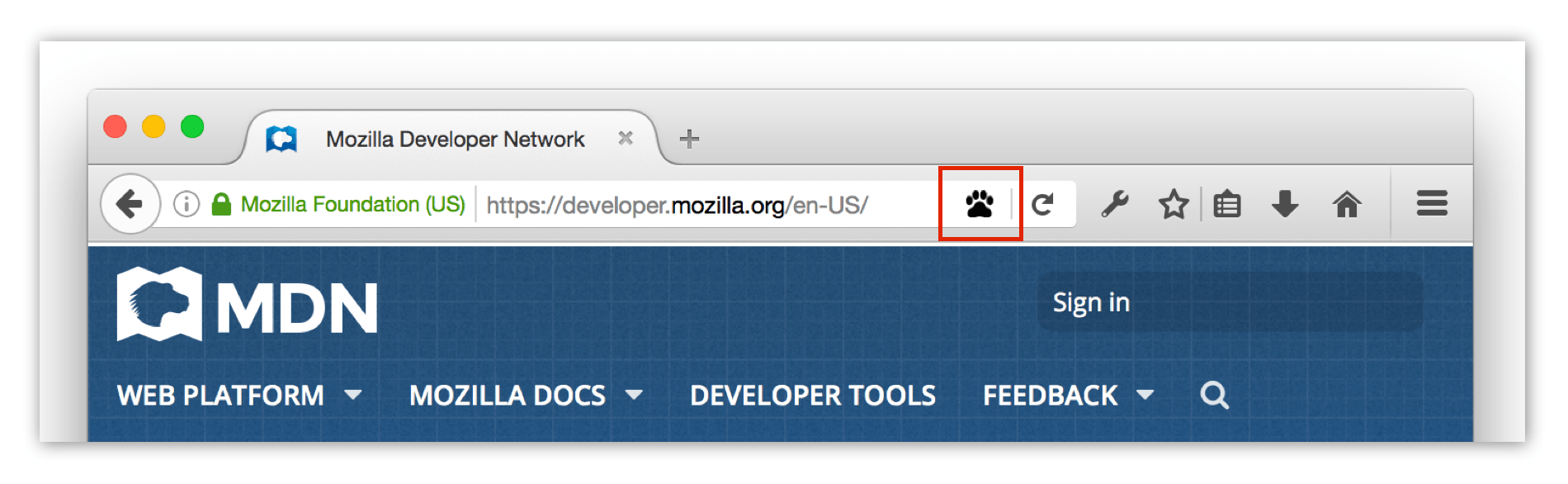
Paw print icon representing a page action

You can listen for clicks on the icon in a background script, or specify a popup that opens when the icon is clicked.

If you specify a popup, you define its contents and behavior using HTML, CSS, and JavaScript. JavaScript running in the popup gets access to all the same WebExtension APIs as your background scripts. Despite being named pageAction, the action code doesn't get access to web page content. To access web page DOM, you need to add a content script and interact with it.

The button also has a context menu, and you can add items to this menu with the menus API using the page_action menus.ContextType.

Page actions are for actions that are only relevant to particular pages (such as "bookmark the current tab"). If they are relevant to the browser as a whole (such as "show all bookmarks"), use a browser action instead.

Types

pageAction.ImageDataType

Pixel data for an image.

Functions

pageAction.show()

Shows the page action for a given tab.

pageAction.hide()

Hides the page action for a given tab.

pageAction.isShown()

Checks whether the page action is shown or not.

pageAction.setTitle()

Sets the page action's title. This is displayed in a tooltip over the page action.

pageAction.getTitle()

Gets the page action's title.

pageAction.setIcon()

Sets the page action's icon.

pageAction.setPopup()

Sets the URL for the page action's popup.

pageAction.getPopup()

Gets the URL for the page action's popup.

pageAction.openPopup()

Opens the page action's popup.

Events

pageAction.onClicked

Fired when a page action icon is clicked. This event will not fire if the page action has a popup.

Example extensions

Browser compatibility

desktop mobile
Chrome
Edge
Firefox
Opera
Safari
Firefox for Android
Safari on iOS
pageAction
Chrome – Full support
Chrome 23 (Release date: 2012-11-06)
footnote
footnote Available for use in Manifest V2 only.
Edge – Full support
Edge 14 (Release date: 2016-08-02)
footnote
footnote Available for use in Manifest V2 only.
Firefox – Full support
Firefox 45 (Release date: 2016-03-08)
footnote Full support
Opera – Full support
Opera 15 (Release date: 2013-07-02)
footnote
footnote Available for use in Manifest V2 only.
Safari – Full support
Safari 14 (Release date: 2020-09-16)
footnote
footnote Available for use in Manifest V2 only.
Firefox for Android – Full support
Firefox for Android 50 (Release date: 2016-11-15)
footnote Full support
Safari on iOS – Full support
Safari on iOS 15 (Release date: 2021-09-20)
footnote
footnote Available for use in Manifest V2 only.
ImageDataType
Chrome – Full support
Chrome 23 (Release date: 2012-11-06)
footnote Full support
Edge – Full support
Edge 79 (Release date: 2020-01-15)
footnote Full support
Firefox – Full support
Firefox 45 (Release date: 2016-03-08)
footnote Full support
Opera – Full support
Opera 15 (Release date: 2013-07-02)
footnote Full support
Safari – Full support
Safari 14 (Release date: 2020-09-16)
footnote Full support
Firefox for Android – Full support
Firefox for Android 79 (Release date: 2020-07-28)
footnote Full support
Safari on iOS – Full support
Safari on iOS 15 (Release date: 2021-09-20)
footnote Full support
getPopup
Chrome – Full support
Chrome 19 (Release date: 2012-05-15)
footnote Full support
Edge – Full support
Edge 14 (Release date: 2016-08-02)
footnote Full support
Firefox – Full support
Firefox 45 (Release date: 2016-03-08)
footnote Full support
Opera – Full support
Opera 15 (Release date: 2013-07-02)
footnote Full support
Safari – Full support
Safari 14 (Release date: 2020-09-16)
footnote Full support
Firefox for Android – Full support
Firefox for Android 50 (Release date: 2016-11-15)
footnote
footnote The 'tabId' parameter is ignored: the page action popup is the same for all tabs.
Safari on iOS – Full support
Safari on iOS 15 (Release date: 2021-09-20)
footnote Full support
getTitle
Chrome – Full support
Chrome 19 (Release date: 2012-05-15)
footnote Full support
Edge – Full support
Edge 14 (Release date: 2016-08-02)
footnote Full support
Firefox – Full support
Firefox 45 (Release date: 2016-03-08)
footnote Full support
Opera – Full support
Opera 15 (Release date: 2013-07-02)
footnote Full support
Safari – Full support
Safari 14 (Release date: 2020-09-16)
footnote Full support
Firefox for Android – Full support
Firefox for Android 79 (Release date: 2020-07-28)
footnote Full support
Safari on iOS – Full support
Safari on iOS 15 (Release date: 2021-09-20)
footnote Full support
hide
Chrome – Full support
Chrome 4 (Release date: 2010-01-25)
footnote Full support
Edge – Full support
Edge 14 (Release date: 2016-08-02)
footnote Full support
Firefox – Full support
Firefox 45 (Release date: 2016-03-08)
footnote Full support
Opera – Full support
Opera 15 (Release date: 2013-07-02)
footnote Full support
Safari – No support
Safari
footnote No support
Firefox for Android – Full support
Firefox for Android 50 (Release date: 2016-11-15)
footnote
footnote Before version 56, the 'tabId' parameter was ignored, and the page action was hidden for all tabs.
Safari on iOS – No support
Safari on iOS
footnote No support
isShown
Chrome – No support
Chrome
footnote No support
Edge – No support
Edge
footnote No support
Firefox – Full support
Firefox 59 (Release date: 2018-03-13)
footnote Full support
Opera – No support
Opera
footnote No support
Safari – No support
Safari
footnote No support
Firefox for Android – Full support
Firefox for Android 79 (Release date: 2020-07-28)
footnote Full support
Safari on iOS – No support
Safari on iOS
footnote No support
onClicked
Chrome – Full support
Chrome 4 (Release date: 2010-01-25)
footnote Full support
Edge – Full support
Edge 14 (Release date: 2016-08-02)
footnote Full support
Firefox – Full support
Firefox 45 (Release date: 2016-03-08)
footnote Full support
Opera – Full support
Opera 15 (Release date: 2013-07-02)
footnote Full support
Safari – Full support
Safari 14 (Release date: 2020-09-16)
footnote Full support
Firefox for Android – Full support
Firefox for Android 50 (Release date: 2016-11-15)
footnote Full support
Safari on iOS – Full support
Safari on iOS 15 (Release date: 2021-09-20)
footnote Full support
onClicked.OnClickData
Chrome – No support
Chrome
footnote No support
Edge – No support
Edge
footnote No support
Firefox – Full support
Firefox 72 (Release date: 2020-01-07)
footnote Full support
Opera – No support
Opera
footnote No support
Safari – Full support
Safari 14 (Release date: 2020-09-16)
footnote Full support
Firefox for Android – No support
Firefox for Android
footnote No support
Safari on iOS – Full support
Safari on iOS 15 (Release date: 2021-09-20)
footnote Full support
onClicked.tab
Chrome – Full support
Chrome 78 (Release date: 2019-10-22)
footnote Full support
Edge – Full support
Edge 14 (Release date: 2016-08-02)
footnote Full support
Firefox – Full support
Firefox 45 (Release date: 2016-03-08)
footnote Full support
Opera – Full support
Opera 65 (Release date: 2019-11-13)
footnote Full support
Safari – Full support
Safari 14 (Release date: 2020-09-16)
footnote Full support
Firefox for Android – Full support
Firefox for Android 50 (Release date: 2016-11-15)
footnote Full support
Safari on iOS – Full support
Safari on iOS 15 (Release date: 2021-09-20)
footnote Full support
openPopup
Chrome – No support
Chrome
footnote No support
Edge – No support
Edge
footnote No support
Firefox – Full support
Firefox 57 (Release date: 2017-11-14)
footnote Full support
Opera – No support
Opera
footnote No support
Safari – Full support
Safari 16 (Release date: 2022-09-12)
footnote Full support
Firefox for Android – Full support
Firefox for Android 79 (Release date: 2020-07-28)
footnote Full support
Safari on iOS – Full support
Safari on iOS 16 (Release date: 2022-09-12)
footnote Full support
setIcon
Chrome – Full support
Chrome 23 (Release date: 2012-11-06)
footnote
footnote Before Chrome 23, path couldn't specify multiple icon files, but had to be a string specifying a single icon path.
Edge – Full support
Edge 14 (Release date: 2016-08-02)
footnote Full support
Firefox – Full support
Firefox 45 (Release date: 2016-03-08)
footnote Full support
Opera – Full support
Opera 15 (Release date: 2013-07-02)
footnote Full support
Safari – Full support
Safari 14 (Release date: 2020-09-16)
footnote Full support
Firefox for Android – Full support
Firefox for Android 79 (Release date: 2020-07-28)
footnote Full support
Safari on iOS – Full support
Safari on iOS 15 (Release date: 2021-09-20)
footnote Full support
setIcon.imageData
Chrome – Full support
Chrome 23 (Release date: 2012-11-06)
footnote Full support
Edge – Full support
Edge 79 (Release date: 2020-01-15)
footnote Full support
Firefox – Full support
Firefox 45 (Release date: 2016-03-08)
footnote Full support
Opera – Full support
Opera 15 (Release date: 2013-07-02)
footnote Full support
Safari – Full support
Safari 14 (Release date: 2020-09-16)
footnote Full support
Firefox for Android – No support
Firefox for Android
footnote No support
Safari on iOS – Full support
Safari on iOS 15 (Release date: 2021-09-20)
footnote Full support
The path and imageData properties of the details parameter can be set to null.
Chrome – No support
Chrome
footnote No support
Edge – No support
Edge
footnote No support
Firefox – Full support
Firefox 59 (Release date: 2018-03-13)
footnote Full support
Opera – No support
Opera
footnote No support
Safari – Full support
Safari 18 (Release date: 2024-09-16)
footnote Full support
Firefox for Android – No support
Firefox for Android
footnote No support
Safari on iOS – Full support
Safari on iOS 18 (Release date: 2024-09-16)
footnote Full support
setPopup
Chrome – Full support
Chrome 5 (Release date: 2010-05-25)
footnote Full support
Edge – Full support
Edge 14 (Release date: 2016-08-02)
footnote Full support
Firefox – Full support
Firefox 45 (Release date: 2016-03-08)
footnote Full support
Opera – Full support
Opera 15 (Release date: 2013-07-02)
footnote Full support
Safari – Full support
Safari 14 (Release date: 2020-09-16)
footnote Full support
Firefox for Android – Full support
Firefox for Android 50 (Release date: 2016-11-15)
footnote
footnote The 'tabId' parameter is ignored, and the popup is set for all tabs.
Safari on iOS – Full support
Safari on iOS 15 (Release date: 2021-09-20)
footnote Full support
The popup property of the details parameter can be set to null.
Chrome – No support
Chrome
footnote No support
Edge – No support
Edge
footnote No support
Firefox – Full support
Firefox 59 (Release date: 2018-03-13)
footnote Full support
Opera – No support
Opera
footnote No support
Safari – Full support
Safari 18 (Release date: 2024-09-16)
footnote Full support
Firefox for Android – No support
Firefox for Android
footnote No support
Safari on iOS – Full support
Safari on iOS 18 (Release date: 2024-09-16)
footnote Full support
setTitle
Chrome – Full support
Chrome 4 (Release date: 2010-01-25)
footnote Full support
Edge – Full support
Edge 14 (Release date: 2016-08-02)
footnote Full support
Firefox – Full support
Firefox 45 (Release date: 2016-03-08)
footnote Full support
Opera – Full support
Opera 15 (Release date: 2013-07-02)
footnote Full support
Safari – Full support
Safari 14 (Release date: 2020-09-16)
footnote Full support
Firefox for Android – Full support
Firefox for Android 79 (Release date: 2020-07-28)
footnote Full support
Safari on iOS – Partial support
Safari on iOS 15 (Release date: 2021-09-20)
footnote Partial support
footnote The API exists, but the title not visible in the UI.
The title property of the details parameter can be set to null.
Chrome – No support
Chrome
footnote No support
Edge – No support
Edge
footnote No support
Firefox – Full support
Firefox 59 (Release date: 2018-03-13)
footnote Full support
Opera – No support
Opera
footnote No support
Safari – Full support
Safari 18 (Release date: 2024-09-16)
footnote Full support
Firefox for Android – No support
Firefox for Android
footnote No support
Safari on iOS – Full support
Safari on iOS 18 (Release date: 2024-09-16)
footnote Full support
show
Chrome – Full support
Chrome 4 (Release date: 2010-01-25)
footnote Full support
Edge – Full support
Edge 14 (Release date: 2016-08-02)
footnote Full support
Firefox – Full support
Firefox 45 (Release date: 2016-03-08)
footnote Full support
Opera – Full support
Opera 15 (Release date: 2013-07-02)
footnote Full support
Safari – No support
Safari
footnote No support
Firefox for Android – Full support
Firefox for Android 50 (Release date: 2016-11-15)
footnote
footnote Before version 56, the 'tabId' parameter was ignored, and the page action was shown for all tabs.
Safari on iOS – No support
Safari on iOS
footnote No support

Legend

Tip: you can click/tap on a cell for more information.

Full support
Full support
Partial support
Partial support
No support
No support
See implementation notes.

Note: This API is based on Chromium's chrome.pageAction API. This documentation is derived from page_action.json in the Chromium code.