DOMQuad: getBounds() method

Baseline Widely available

This feature is well established and works across many devices and browser versions. It’s been available across browsers since January 2020.

Note: This feature is available in Web Workers.

The DOMQuad method getBounds() returns a DOMRect object representing the smallest rectangle that fully contains the DOMQuad object.

Syntax

js
getBounds()

Parameters

None.

Return value

A DOMRect with the x, y, width, and height properties, defining the bounding box for the DOMQuad based on its corner coordinates.

Examples

This example creates a DOMQuad with four points, then retrieves its bounding rectangle.

js
const quad = new DOMQuad(
  { x: 40, y: 25 },
  { x: 180, y: 8 },
  { x: 210, y: 150 },
  { x: 10, y: 180 },
);

const quadBounds = quad.getBounds();
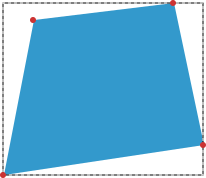
An irregular quadrilateral with none of the sides being vertical or horizontal. Its four corners are marked with red circles. Around this quadrilateral is a dashed rectangle. All sides of this rectangle are vertical or horizontal and tangent the quadrilateral.

The figure shows an irregular quadrilateral represented by a DOMQuad. The four red colored circles represent the DOMPoint attributes p1 to p4. The dashed rectangle represents the bounding rectangle returned by the getBounds() method of the DOMQuad.

Specifications

Specification
Geometry Interfaces Module Level 1
# dom-domquad-getbounds

Browser compatibility

desktop mobile
Chrome
Edge
Firefox
Opera
Safari
Chrome Android
Firefox for Android
Opera Android
Safari on iOS
Samsung Internet
WebView Android
WebView on iOS
getBounds()
Chrome – Full support
Chrome 61 (Release date: 2017-09-05)
footnote Full support
Edge – Full support
Edge 79 (Release date: 2020-01-15)
footnote Full support
Firefox – Full support
Firefox 62 (Release date: 2018-09-05)
footnote Full support
Opera – Full support
Opera 48 (Release date: 2017-09-27)
footnote Full support
Safari – Full support
Safari 11 (Release date: 2017-09-19)
footnote Full support
Chrome Android – Full support
Chrome Android 61 (Release date: 2017-09-05)
footnote Full support
Firefox for Android – Full support
Firefox for Android 62 (Release date: 2018-09-05)
footnote Full support
Opera Android – Full support
Opera Android 45 (Release date: 2018-02-15)
footnote Full support
Safari on iOS – Full support
Safari on iOS 11 (Release date: 2017-09-19)
footnote Full support
Samsung Internet – Full support
Samsung Internet 8 (Release date: 2018-07-18)
footnote Full support
WebView Android – Full support
WebView Android 61 (Release date: 2017-09-05)
footnote Full support
WebView on iOS – Full support
WebView on iOS 11 (Release date: 2017-09-19)
footnote Full support

Legend

Tip: you can click/tap on a cell for more information.

Full support
Full support