DocumentPictureInPicture: requestWindow() method
Limited availability
This feature is not Baseline because it does not work in some of the most widely-used browsers.
Secure context: This feature is available only in secure contexts (HTTPS), in some or all supporting browsers.
The requestWindow() method of the
DocumentPictureInPicture interface opens the Picture-in-Picture window for the current main browsing context. It returns a Promise that fulfills with a Window instance representing the browsing context inside the Picture-in-Picture window.
The requestWindow() method requires transient activation, i.e., it must be invoked in response to a user action such as a mouse click or button press.
Syntax
requestWindow()
requestWindow(options)
Parameters
optionsOptional-
An options object containing the following properties:
disallowReturnToOpenerOptional-
A boolean value. When set to
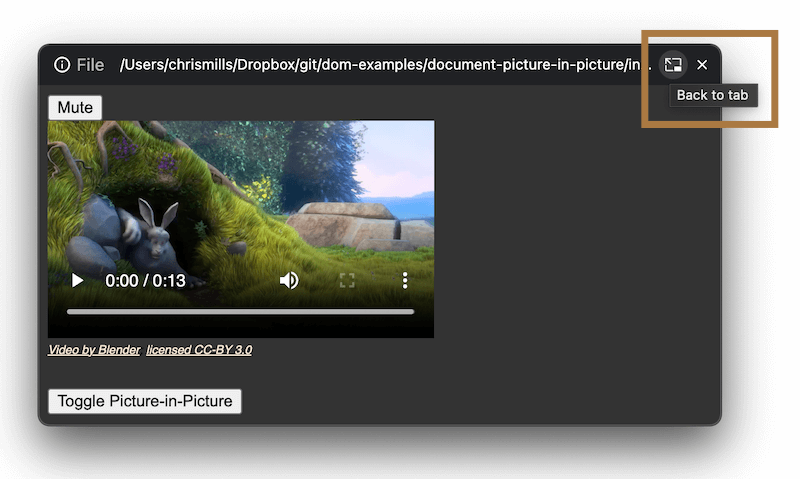
true, this option hints to the browser that it should not display a UI control that enables the user to return to the originating tab and close the Picture-in-Picture window. Defaults tofalse.For example, in Chrome's implementation of this feature, the provided UI control is a "back to tab" button in the Picture-in-Picture window's top bar:
heightOptional-
A non-negative number representing the height to set for the Picture-in-Picture window's viewport, in pixels. Defaults to
0. preferInitialWindowPlacementOptional-
A boolean value, which defaults to
false. When set totrue, it causes the Picture-in-Picture window to always appear back at the position and size it initially opened at, when it is closed and then reopened. By contrast, ifpreferInitialWindowPlacementisfalsethe Picture-in-Picture window's size and position will be remembered when closed and reopened — it will reopen at its previous position and size, for example as set by the user. widthOptional-
A non-negative number representing the width to set for the Picture-in-Picture window's viewport, in pixels. Defaults to
0.
Note:
If one of height or width is specified, the other one must be too, otherwise an error is thrown. If both values are not specified, specified as 0, or set too large, the browser will clamp or ignore the values as appropriate to provide a reasonable user experience. The clamped size will vary depending on implementation, display size, and other factors.
Return value
A Promise that fulfills with a Window object instance representing the browsing context inside the Picture-in-Picture window.
Exceptions
NotSupportedErrorDOMException-
Thrown if the API has been explicitly disabled (for example via browser settings).
NotAllowedErrorDOMException-
Thrown if:
requestWindow()is not called from a top-levelwindowobject.requestWindow()is called from thewindowobject of the Picture-in-Picture window (i.e.,DocumentPictureInPicture.window).requestWindow()is called without transient activation.
RangeErrorDOMException-
Thrown if only one of
heightandwidthare set, or ifheightandwidthare set with negative values.
Examples
const videoPlayer = document.getElementById("player");

// …

// Open a Picture-in-Picture window with all options set
const pipWindow = await window.documentPictureInPicture.requestWindow({
  width: videoPlayer.clientWidth,
  height: videoPlayer.clientHeight,
  disallowReturnToOpener: true,
  preferInitialWindowPlacement: true,
});

// …
Specifications
| Specification |
|---|
| Document Picture-in-Picture Specification # dom-documentpictureinpicture-requestwindow |
Browser compatibility
| desktop | mobile | |||||||||||
|---|---|---|---|---|---|---|---|---|---|---|---|---|
requestWindow
|
|
|
|
|
|
|
|
|
|
|
|
|
disallowReturnToOpener option
|
|
|
|
|
|
|
|
|
|
|
|
|
preferInitialWindowPlacement option
|
|
|
|
|
|
|
|
|
|
|
|
|
Legend
Tip: you can click/tap on a cell for more information.
- Full support
- Full support
- In development. Supported in a pre-release version.
- In development. Supported in a pre-release version.
- No support
- No support