Mixed content

Baseline Widely available *

This feature is well established and works across many devices and browser versions. It’s been available across browsers since January 2020.

* Some parts of this feature may have varying levels of support.

When a web page is loaded from a secure origin, over a secure channel such as HTTPS, the connection with the web server is encrypted, and is therefore protected from eavesdropping and modification by man-in-the-middle attacks. If the securely loaded web page only includes images, scripts, and other resources that are also hosted on secure origins, users can be confident that the whole page is safe from these kinds of attacks.

"Mixed content" refers to securely loaded web pages that use resources to be fetched via HTTP or another insecure protocol. This kind of web page is potentially unsafe because any resources that are sent insecurely can be viewed, possibly revealing sensitive information, and/or modified by an attacker. Scripts are particularly dangerous because they can modify any aspect of the page, but all types of resources have some risk. For example, images can be modified to give the user false or misleading information, or to change the apparent function of a button.

"Mixed downloads" refer to resource downloads initiated from a secure context, but fetched over an insecure connection. These share the same risks as mixed content: downloads appear to come from a secure origin, but could have been modified or viewed en-route.

You should avoid using mixed content and mixed downloads in your websites! Browsers mitigate the risks of mixed content by auto-upgrading image, video, and audio mixed content requests from HTTP to HTTPS, and block insecure requests for all other resource types. They should also block mixed downloads by default.

Types of mixed content

Mixed content in a web page is divided into two categories: "upgradable content" and "blockable content". Browsers should automatically upgrade requests for upgradable content from HTTP to HTTPS, and block requests for the blockable content.

This approach ensures that all content in a secure context is either loaded via a secure channel or blocked, which is safer for users than displaying a mix of secure and insecure content, and less disruptive than breaking web pages by blocking absolutely all insecure content.

Note: Earlier versions of the specification divided mixed content into "blockable" and "optionally blockable" categories:

  • Blockable content types, also referred to as "active mixed content", were those that could modify other parts of the web page, such as scripts and stylesheets. The potential risk if these files are modified is very high, and browsers were required to block them.
  • Optionally blockable content types, also known as "passive mixed content", were those that could not modify other content in the web page, such as images, videos, and audio files. The potential risk of allowing these files was lower, so browsers could choose to block or display them, or defer the decision to the user.

The set of resource types that comprise "upgradable content" was seeded from the set of "optionally blockable" mixed content. The expectation is that any new file types will be defined as blockable content, and some upgradable content may become blockable in future.

Upgradable content

Upgradable content requests are those where an insecure request will automatically be upgraded to a secure request, by modifying the origin scheme from http to https. The remote server will either respond with the resource, or a status code indicating that it was not found.

The resource types in this category are those where the blocking the request would risk of breaking significant portions of the web. These currently correspond to the mixed content types that were previously "optionally blockable", as these are still used on some websites.

The following elements are upgradable (except where the URL host is specified as an IP address — see the following section):

  • <img> where origin is set via src attribute, including SVG documents (but not when setting resources with srcset or <picture>).
  • CSS image elements such as: background-image, border-image, etc.
  • <audio> where origin is set with src attribute.
  • <video> where origin is set with src attribute
  • <source> where video or origin resource is set.

Blockable content

Blockable content is defined as "all mixed content that is not upgradable".

This includes HTTP requests resulting from the following elements (this list is not exhaustive):

Mixed content requests that would otherwise be upgraded are blocked if the URL's host is an IP address rather than a domain name. So <img src="http://example.com/image.png"> will be upgraded, but <img src="http://93.184.215.14/image.png"> is blocked.

Examples of mixed content requests

Mixed content requests are insecure requests for resources from a secure context:

The following examples demonstrate secure, insecure, and mixed content requests:

  • http://insecure.com loads http://also.insecure.com — is not a mixed content request because both origins are insecure.
  • https://secure.com loads http://insecure.com — is a mixed content request because the insecure resource http://insecure.com is loaded into the secure context https://secure.com.
  • http://insecure.com loads https://secure.com in an <iframe>, which in turn loads http://also.insecure.com — loading https://secure.com into http://insecure.com is not a mixed content request (there is no restriction on loading a secure context into an insecure context). However loading http://also.insecure.com into the secure frame https://secure.com is a mixed content request.
  • https://secure.com frames a data: URL, which loads http://insecure.com — this is a mixed content request, because https://secure.com (and hence data:) were securely loaded and http://insecure.com is insecure.

Mixed context requests can also be made from secure contexts such as plugins or workers, and will be upgraded/blocked in the same way.

Note however that navigation requests from a secure context that target insecure target top-level browsing contexts are not considered mixed content as they create a new context that will either be secure or insecure independent of the origin of the request.

Loading locally delivered mixed-resources

Local resources are considered to be from secure origins, just like HTTPS origins. This includes file: URLs, and content accessed from loopback addresses such as http://127.0.0.1/ or http://localhost/.

You can load these files from secure contexts, and you will still have a secure context. However if a local file loads insecure resource via http:, it would be a mixed content request.

Support for loading local content can be checked in the Browser compatibility section.

Mixed downloads

A mixed download is a resource download from a secure context over an insecure connection. They are problematic for the same reasons as mixed content — content may be intercepted and/or modified by an attacker, and it is not obvious to users that this might happen on a secure site.

For example, the following code defines an <a> element that could be used to download the page at the insecure origin http://example.com/. If this code is in a page that is served over HTTPS, saving the link results in a mixed download.

html
<a href="http://example.com/" download>Download</a>

Browsers are expected to block mixed downloads, and secure sites should not include them.

Note: Browsers commonly block mixed downloads by default, but inform users of the risk and allow them to keep or discard the download.

Developer console

The developer console shows warnings when mixed content is upgraded or blocked. These can be used to debug and fix mixed-content in your websites.

The screenshot below shows the console warning when an image is upgraded on Firefox (Chrome has a similar warning).
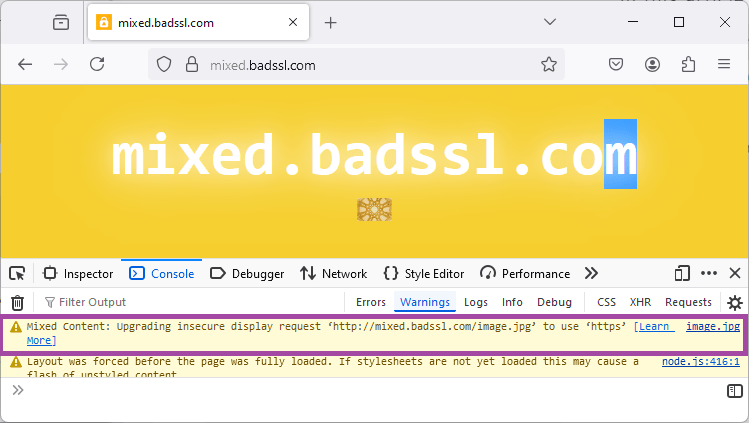
Screen shot of the web console displaying upgrade warning for mixed content image.

On browser versions that still display "optionally blockable" content, an icon is used to indicate that there is mixed content in the displayed content, along with a console warning. The screenshot below shows the icon and console warning for Firefox starting supporting upgradable mixed-content.
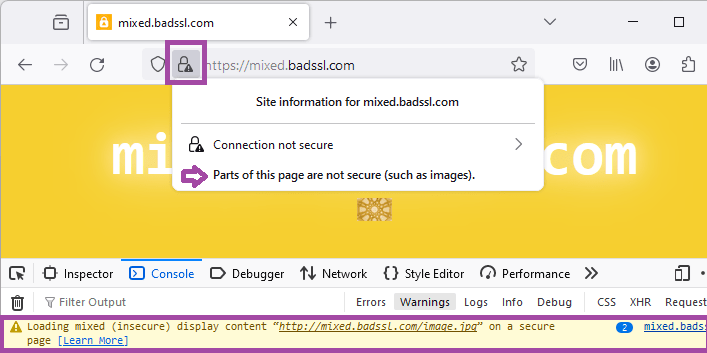
Screen shot of the web console displaying display warning for mixed content image.

Fixing mixed content issues

The best strategy to avoid issues with mixed content is to serve all the content as HTTPS:

  • Serve all content from your domain as HTTPS.

  • Make all references to resources hosted on your domain into relative links or HTTPS links, including for downloads.

  • If using resource on other sites use HTTPS versions, if available.

    Most sites provide HTTPS versions of shared resources. Often the easiest approach is to replace all http:// links with https:// and then use tools such as LinkChecker to verify that the links all work.

There are a number of ways to verify that your site is free of mixed content including:

  • Navigate your site, and check your browser's developer console for mixed content warnings.
  • Disable all mixed content on your browser and test that pages work as expected. This is the default for Safari, but most browsers support some mechanism for blocking all mixed content (see compatibility data).
  • Use a desktop-based web crawler like HTTPSChecker, or a CLI tool like mcdetect, to check your website recursively and find links to insecure content.
  • Use an online tool like Mixed Content Checker to check your site.

Specifications

Specification
Mixed Content
# intro

Browser compatibility

desktop mobile
Chrome
Edge
Firefox
Opera
Safari
Chrome Android
Firefox for Android
Opera Android
Safari on iOS
Samsung Internet
WebView Android
WebView on iOS
Blocks some or all insecure mixed content.
Chrome – Full support
Chrome 79 (Release date: 2019-12-10)
footnote Full support
Edge – Full support
Edge 79 (Release date: 2020-01-15)
footnote Full support
Firefox – Full support
Firefox 23 (Release date: 2013-08-06)
footnote Full support
Opera – Full support
Opera 66 (Release date: 2020-01-07)
footnote Full support
Safari – Full support
Safari 9.1 (Release date: 2016-03-21)
footnote Full support
Chrome Android – Full support
Chrome Android 79 (Release date: 2019-12-17)
footnote Full support
Firefox for Android – Full support
Firefox for Android 23 (Release date: 2013-08-06)
footnote Full support
Opera Android – Full support
Opera Android 57 (Release date: 2020-03-30)
footnote Full support
Safari on iOS – Full support
Safari on iOS 9.3 (Release date: 2016-03-21)
footnote Full support
Samsung Internet – Full support
Samsung Internet 12 (Release date: 2020-06-19)
footnote Full support
WebView Android – Full support
WebView Android 79 (Release date: 2019-12-17)
footnote Full support
WebView on iOS – Full support
WebView on iOS 9.3 (Release date: 2016-03-21)
footnote Full support
Allow mixed content from file: URLs.
Chrome – Full support
Chrome 79 (Release date: 2019-12-10)
footnote Full support
Edge – Full support
Edge 79 (Release date: 2020-01-15)
footnote Full support
Firefox – Full support
Firefox 23 (Release date: 2013-08-06)
footnote Full support
Opera – Full support
Opera 66 (Release date: 2020-01-07)
footnote Full support
Safari – No support
Safari
footnote No support
Chrome Android – Full support
Chrome Android 79 (Release date: 2019-12-17)
footnote Full support
Firefox for Android – Full support
Firefox for Android 23 (Release date: 2013-08-06)
footnote Full support
Opera Android – Full support
Opera Android 57 (Release date: 2020-03-30)
footnote Full support
Safari on iOS – No support
Safari on iOS
footnote No support
Samsung Internet – Full support
Samsung Internet 12 (Release date: 2020-06-19)
footnote Full support
WebView Android – Full support
WebView Android 79 (Release date: 2019-12-17)
footnote Full support
WebView on iOS – No support
WebView on iOS
footnote No support
Allow mixed content from localhost addresses (http://localhost/ and http://*.localhost/).
Chrome – Full support
Chrome 79 (Release date: 2019-12-10)
footnote Full support
Edge – Full support
Edge 79 (Release date: 2020-01-15)
footnote Full support
Firefox – Full support
Firefox 84 (Release date: 2020-12-15)
footnote Full support
Opera – Full support
Opera 66 (Release date: 2020-01-07)
footnote Full support
Safari – No support
Safari
footnote No support
Chrome Android – Full support
Chrome Android 79 (Release date: 2019-12-17)
footnote Full support
Firefox for Android – Full support
Firefox for Android 84 (Release date: 2020-12-15)
footnote Full support
Opera Android – Full support
Opera Android 57 (Release date: 2020-03-30)
footnote Full support
Safari on iOS – No support
Safari on iOS
footnote No support
Samsung Internet – Full support
Samsung Internet 12 (Release date: 2020-06-19)
footnote Full support
WebView Android – Full support
WebView Android 79 (Release date: 2019-12-17)
footnote Full support
WebView on iOS – No support
WebView on iOS
footnote No support
Allow mixed content from loopback address (http://127.0.0.1/).
Chrome – Full support
Chrome 79 (Release date: 2019-12-10)
footnote Full support
Edge – Full support
Edge 79 (Release date: 2020-01-15)
footnote Full support
Firefox – Full support
Firefox 55 (Release date: 2017-08-08)
footnote Full support
Opera – Full support
Opera 66 (Release date: 2020-01-07)
footnote Full support
Safari – No support
Safari
footnote No support
Chrome Android – Full support
Chrome Android 79 (Release date: 2019-12-17)
footnote Full support
Firefox for Android – Full support
Firefox for Android 55 (Release date: 2017-08-08)
footnote Full support
Opera Android – Full support
Opera Android 57 (Release date: 2020-03-30)
footnote Full support
Safari on iOS – No support
Safari on iOS
footnote No support
Samsung Internet – Full support
Samsung Internet 12 (Release date: 2020-06-19)
footnote Full support
WebView Android – Full support
WebView Android 79 (Release date: 2019-12-17)
footnote Full support
WebView on iOS – No support
WebView on iOS
footnote No support
Upgradable image mixed content by default.
Chrome – Full support
Chrome 86 (Release date: 2020-10-20)
footnote Full support
Edge – Full support
Edge 86 (Release date: 2020-10-09)
footnote Full support
Firefox – Full support
Firefox 127 (Release date: 2024-06-11)
footnote
footnote Set security.mixed_content.upgrade_display_content preference to true to allow HTTP fetching and display of upgradable content.
footnote Set security.mixed_content.block_display_content preference to true to block all mixed content.
Opera – Full support
Opera 72 (Release date: 2020-10-21)
footnote Full support
Safari – No support
Safari
footnote No support
Chrome Android – Full support
Chrome Android 86 (Release date: 2020-10-20)
footnote Full support
Firefox for Android – Full support
Firefox for Android 127 (Release date: 2024-06-11)
footnote
footnote Set security.mixed_content.upgrade_display_content preference to true to allow HTTP fetching and display of upgradable content.
footnote Set security.mixed_content.block_display_content preference to true to block all mixed content.
Opera Android – Full support
Opera Android 61 (Release date: 2020-12-07)
footnote Full support
Safari on iOS – No support
Safari on iOS
footnote No support
Samsung Internet – Full support
Samsung Internet 14 (Release date: 2021-04-17)
footnote Full support
WebView Android – Full support
WebView Android 86 (Release date: 2020-10-20)
footnote Full support
WebView on iOS – No support
WebView on iOS
footnote No support
Upgrade video and audio content by default.
Chrome – Full support
Chrome 80 (Release date: 2020-02-04)
footnote Full support
Edge – Full support
Edge 80 (Release date: 2020-02-07)
footnote Full support
Firefox – Full support
Firefox 127 (Release date: 2024-06-11)
footnote
footnote Set security.mixed_content.upgrade_display_content preference to true to allow HTTP fetching and display of upgradable content.
footnote Set security.mixed_content.block_display_content preference to true to block all mixed content.
Opera – Full support
Opera 67 (Release date: 2020-03-03)
footnote Full support
Safari – No support
Safari
footnote No support
Chrome Android – Full support
Chrome Android 80 (Release date: 2020-02-04)
footnote Full support
Firefox for Android – Full support
Firefox for Android 127 (Release date: 2024-06-11)
footnote
footnote Set security.mixed_content.upgrade_display_content preference to true to allow HTTP fetching and display of upgradable content.
footnote Set security.mixed_content.block_display_content preference to true to block all mixed content.
Opera Android – Full support
Opera Android 57 (Release date: 2020-03-30)
footnote Full support
Safari on iOS – No support
Safari on iOS
footnote No support
Samsung Internet – Full support
Samsung Internet 13 (Release date: 2020-12-02)
footnote Full support
WebView Android – Full support
WebView Android 80 (Release date: 2020-02-04)
footnote Full support
WebView on iOS – No support
WebView on iOS
footnote No support
Block mixed downloads.
Chrome – Full support
Chrome 92 (Release date: 2021-07-20)
footnote Full support
Edge – Full support
Edge 92 (Release date: 2021-07-22)
footnote Full support
Firefox – Full support
Firefox 90 (Release date: 2021-07-13)
footnote Full support
Opera – Full support
Opera 78 (Release date: 2021-08-03)
footnote Full support
Safari – No support
Safari
footnote No support
Chrome Android – Full support
Chrome Android 92 (Release date: 2021-07-20)
footnote Full support
Firefox for Android – Full support
Firefox for Android 90 (Release date: 2021-07-13)
footnote Full support
Opera Android – Full support
Opera Android 65 (Release date: 2021-10-20)
footnote Full support
Safari on iOS – No support
Safari on iOS
footnote No support
Samsung Internet – Full support
Samsung Internet 16 (Release date: 2021-11-25)
footnote Full support
WebView Android – Full support
WebView Android 92 (Release date: 2021-07-20)
footnote Full support
WebView on iOS – No support
WebView on iOS
footnote No support
Block 'blockable' mixed content.
Chrome – Full support
Chrome 79 (Release date: 2019-12-10)
footnote
footnote From version 79 blocks iframes, scripts, and stylesheets.
Edge – Full support
Edge 79 (Release date: 2020-01-15)
footnote
footnote From version 79 blocks iframes, scripts, and stylesheets.
Firefox – Full support
Firefox 23 (Release date: 2013-08-06)
footnote Full support
Opera – Full support
Opera 66 (Release date: 2020-01-07)
footnote
footnote From version 66 blocks iframes, scripts, and stylesheets.
Safari – Full support
Safari 9.1 (Release date: 2016-03-21)
footnote Full support
Chrome Android – Full support
Chrome Android 79 (Release date: 2019-12-17)
footnote
footnote From version 79 blocks iframes, scripts, and stylesheets.
Firefox for Android – Full support
Firefox for Android 23 (Release date: 2013-08-06)
footnote Full support
Opera Android – Full support
Opera Android 57 (Release date: 2020-03-30)
footnote
footnote From version 57 blocks iframes, scripts, and stylesheets.
Safari on iOS – Full support
Safari on iOS 9.3 (Release date: 2016-03-21)
footnote Full support
Samsung Internet – Full support
Samsung Internet 12 (Release date: 2020-06-19)
footnote
footnote From version 12.0 blocks iframes, scripts, and stylesheets.
WebView Android – Full support
WebView Android 79 (Release date: 2019-12-17)
footnote
footnote From version 79 blocks iframes, scripts, and stylesheets.
WebView on iOS – Full support
WebView on iOS 9.3 (Release date: 2016-03-21)
footnote Full support
User permission in private network allows mixed content checks to be skipped.
Chrome – No support
Chrome 124 – 137 (Release date: 2024-04-16)
unknown Support unknown
Chrome – No support
Chrome 138 (Release date: 2025-06-24)
disabled
disabled From version 138 users must explicitly set the #local-network-access-check preference to Enabled. To change preferences in Chrome, visit chrome://flags.
Edge – No support
Edge 124 – 137 (Release date: 2024-04-18)
unknown Support unknown
Edge – No support
Edge 138 (Release date: 2025-06-26)
disabled
disabled From version 138 users must explicitly set the #local-network-access-check preference to Enabled. To change preferences in Edge, visit about:flags.
Firefox – No support
Firefox
footnote No support
Opera – No support
Opera 110 – 121 (Release date: 2024-05-14)
unknown Support unknown
Opera – No support
Opera 122 (Release date: 2025-09-11)
disabled
disabled From version 122 users must explicitly set the #local-network-access-check preference to Enabled. To change preferences in Opera, visit opera://flags.
Safari – No support
Safari
footnote No support
Chrome Android – No support
Chrome Android 124 – 137 (Release date: 2024-04-16)
unknown Support unknown
Chrome Android – No support
Chrome Android 138 (Release date: 2025-06-24)
disabled
disabled From version 138 users must explicitly set the #local-network-access-check preference to Enabled. To change preferences in Chrome Android, visit chrome://flags.
Firefox for Android – No support
Firefox for Android
footnote No support
Opera Android – No support
Opera Android 82 – 90 (Release date: 2024-05-02)
footnote Removed in 91 and later
Safari on iOS – No support
Safari on iOS
footnote No support
Samsung Internet – Full support
Samsung Internet 27 (Release date: 2024-11-06)
footnote Full support
WebView Android – No support
WebView Android 124 – 137 (Release date: 2024-04-16)
footnote Removed in 138 and later
WebView on iOS – No support
WebView on iOS
footnote No support

Legend

Tip: you can click/tap on a cell for more information.

Full support
Full support
No support
No support
See implementation notes.
User must explicitly enable this feature.
Has more compatibility info.

See also