Using channel messaging

Baseline Widely available

This feature is well established and works across many devices and browser versions. It’s been available across browsers since September 2015.

Note: This feature is available in Web Workers.

The Channel Messaging API allows two separate scripts running in different browsing contexts attached to the same document (e.g., two <iframe> elements, the main document and a single <iframe>, or two documents via a SharedWorker) to communicate directly, passing messages between each other through two-way channels (or pipes) with a port at each end.

In this article we'll explore the basics of using this technology.

Use cases

Channel messaging is mainly useful in cases where you've got a social site that embeds capabilities from other sites into its main interface via iframes, such as games, address books or an audio player with personalized music choices. When these act as standalone units, things are OK, but the difficulty comes when you want interaction between the main site and the <iframe> elements, or between different <iframe> elements. For example, what if you wanted to add a contact to the address book from the main site, add high scores from your game to your main profile, or add new background music choices from the audio player to the game? Such things are not so easy using conventional web technology, because of the security models the web uses. You have to think about whether the origins trust each other, and how the messages are passed.

Message channels on the other hand can provide a secure channel that allows you to pass data between different browsing contexts.

Note: For more information and ideas, the Ports as the basis of an object-capability model on the Web section of the spec is a useful read.

Simple examples

To get you started, we have published a couple of demos on GitHub. First, check our channel messaging basic demo (run it live too), which shows a really simple single message transfer between a page and an embedded <iframe>.

Second, have a look at our multimessaging demo (run this live), which shows a slightly more complex setup that can send multiple messages between the main page and an IFrame.

We'll be focusing on the latter example in this article, which looks like:
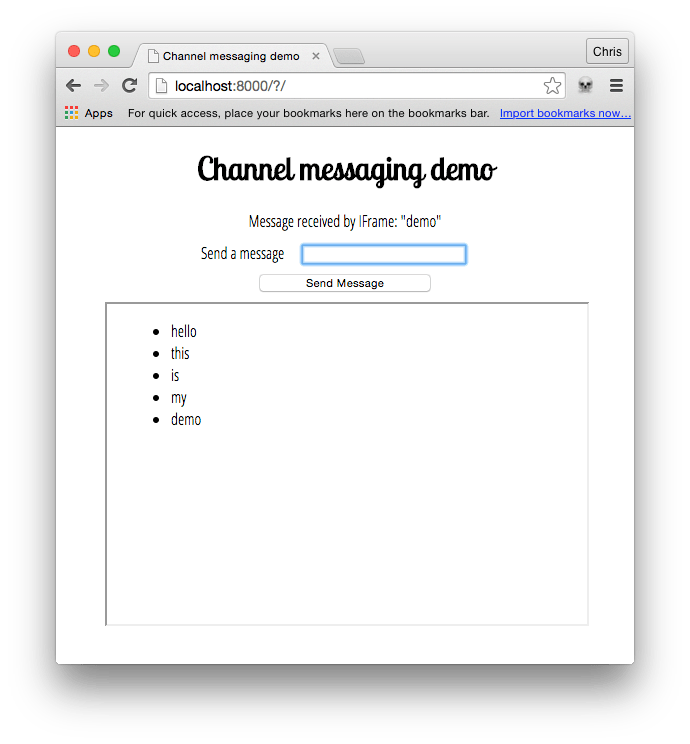
Demo with "Hello this is my demo" sent as five separate messages. The messages are displayed as a bulleted list.

Creating the channel

In the main page of the demo, we have a simple form with a text input for entering messages to be sent to an <iframe>. We also have a paragraph which we will use later on to display confirmation messages that we will receive back from the <iframe>.

js
const input = document.getElementById("message-input");
const output = document.getElementById("message-output");
const button = document.querySelector("button");
const iframe = document.querySelector("iframe");

const channel = new MessageChannel();
const port1 = channel.port1;

// Wait for the iframe to load
iframe.addEventListener("load", onLoad);

function onLoad() {
  // Listen for button clicks
  button.addEventListener("click", onClick);

  // Listen for messages on port1
  port1.onmessage = onMessage;

  // Transfer port2 to the iframe
  iframe.contentWindow.postMessage("init", "*", [channel.port2]);
}

// Post a message on port1 when the button is clicked
function onClick(e) {
  e.preventDefault();
  port1.postMessage(input.value);
}

// Handle messages received on port1
function onMessage(e) {
  output.innerHTML = e.data;
  input.value = "";
}

We start off by creating a new message channel by using the MessageChannel() constructor.

When the IFrame has loaded, we register an onclick handler for our button and an onmessage handler for MessageChannel.port1. Finally we transfer MessageChannel.port2 to the IFrame using the window.postMessage method.

Let's explore how the iframe.contentWindow.postMessage line works in more detail. It takes three arguments:

  1. The message being sent. For this initial port transferring this message could be an empty string but in this example it is set to 'init'.
  2. The origin the message is to be sent to. * means "any origin".
  3. An object, the ownership of which is transferred to the receiving browsing context. In this case, we are transferring MessageChannel.port2 to the IFrame, so it can be used to communicate with the main page.

When our button is clicked, we prevent the form from submitting as normal and then send the value entered in our text input to the IFrame via the MessageChannel.

Receiving the port and message in the IFrame

In the <iframe> elements, we have the following JavaScript:

js
const list = document.querySelector("ul");
let port2;

// Listen for the initial port transfer message
window.addEventListener("message", initPort);

// Setup the transferred port
function initPort(e) {
  port2 = e.ports[0];
  port2.onmessage = onMessage;
}

// Handle messages received on port2
function onMessage(e) {
  const listItem = document.createElement("li");
  listItem.textContent = e.data;
  list.appendChild(listItem);
  port2.postMessage(`Message received by IFrame: "${e.data}"`);
}

When the initial message is received from the main page via the window.postMessage method, we run the initPort function. This saves the transferred port and registers an onmessage handler that will be called each time a message is passed through our MessageChannel.

When a message is received from the main page, we create a list item and insert it in the unordered list, setting the textContent of the list item equal to the event's data attribute (this contains the actual message).

Next, we post a confirmation message back to the main page via the message channel by calling MessagePort.postMessage on MessageChannel.port2 that was initially transferred to the iframe.

Receiving the confirmation in the main page

Returning to the main page, let's now look at the onmessage handler function.

js
// Handle messages received on port1
function onMessage(e) {
  output.innerHTML = e.data;
  input.value = "";
}

When a message is received back from the IFrame confirming that the original message was received successfully, this outputs the confirmation to a paragraph and empties the text input ready for the next message to be sent.

Specifications

Specification
HTML
# message-channels
HTML
# message-ports

Browser compatibility

api.MessageChannel

desktop mobile server
Chrome
Edge
Firefox
Opera
Safari
Chrome Android
Firefox for Android
Opera Android
Safari on iOS
Samsung Internet
WebView Android
WebView on iOS
Bun
Deno
Node.js
MessageChannel
Chrome – Full support
Chrome 2 (Release date: 2009-05-21)
footnote Full support
Edge – Full support
Edge 12 (Release date: 2015-07-29)
footnote Full support
Firefox – Full support
Firefox 41 (Release date: 2015-09-22)
footnote Full support
Opera – Full support
Opera 10.6 (Release date: 2010-07-01)
footnote Full support
Safari – Full support
Safari 5 (Release date: 2010-06-07)
footnote Full support
Chrome Android – Full support
Chrome Android 18 (Release date: 2012-06-27)
footnote Full support
Firefox for Android – Full support
Firefox for Android 41 (Release date: 2015-09-22)
footnote Full support
Opera Android – Full support
Opera Android 11 (Release date: 2011-03-22)
footnote Full support
Safari on iOS – Full support
Safari on iOS 4.2 (Release date: 2010-11-22)
footnote Full support
Samsung Internet – Full support
Samsung Internet 1 (Release date: 2013-04-27)
footnote Full support
WebView Android – Full support
WebView Android 4.4 (Release date: 2013-12-09)
footnote Full support
WebView on iOS – Full support
WebView on iOS 4.2 (Release date: 2010-11-22)
footnote Full support
Bun – Full support
Bun 1 (Release date: 2023-09-08)
footnote Full support
Deno – Full support
Deno 1.12 (Release date: 2021-07-13)
footnote Full support
Node.js – Partial support
Node.js 11.7 – 14.18 (Release date: 2019-01-18)
footnote Partial support
footnote Available as a part of the worker_threads module.
Node.js – Full support
Node.js 15 (Release date: 2020-10-20)
footnote Full support
MessageChannel() constructor
Chrome – Full support
Chrome 2 (Release date: 2009-05-21)
footnote Full support
Edge – Full support
Edge 12 (Release date: 2015-07-29)
footnote Full support
Firefox – Full support
Firefox 41 (Release date: 2015-09-22)
footnote Full support
Opera – Full support
Opera 10.6 (Release date: 2010-07-01)
footnote Full support
Safari – Full support
Safari 5 (Release date: 2010-06-07)
footnote Full support
Chrome Android – Full support
Chrome Android 18 (Release date: 2012-06-27)
footnote Full support
Firefox for Android – Full support
Firefox for Android 41 (Release date: 2015-09-22)
footnote Full support
Opera Android – Full support
Opera Android 11 (Release date: 2011-03-22)
footnote Full support
Safari on iOS – Full support
Safari on iOS 4.2 (Release date: 2010-11-22)
footnote Full support
Samsung Internet – Full support
Samsung Internet 1 (Release date: 2013-04-27)
footnote Full support
WebView Android – Full support
WebView Android 4.4 (Release date: 2013-12-09)
footnote Full support
WebView on iOS – Full support
WebView on iOS 4.2 (Release date: 2010-11-22)
footnote Full support
Bun – Full support
Bun 1 (Release date: 2023-09-08)
footnote Full support
Deno – Full support
Deno 1.12 (Release date: 2021-07-13)
footnote Full support
Node.js – Full support
Node.js 11.7 (Release date: 2019-01-18)
footnote Full support
port1
Chrome – Full support
Chrome 2 (Release date: 2009-05-21)
footnote Full support
Edge – Full support
Edge 12 (Release date: 2015-07-29)
footnote Full support
Firefox – Full support
Firefox 41 (Release date: 2015-09-22)
footnote Full support
Opera – Full support
Opera 10.6 (Release date: 2010-07-01)
footnote Full support
Safari – Full support
Safari 5 (Release date: 2010-06-07)
footnote Full support
Chrome Android – Full support
Chrome Android 18 (Release date: 2012-06-27)
footnote Full support
Firefox for Android – Full support
Firefox for Android 41 (Release date: 2015-09-22)
footnote Full support
Opera Android – Full support
Opera Android 11 (Release date: 2011-03-22)
footnote Full support
Safari on iOS – Full support
Safari on iOS 4.2 (Release date: 2010-11-22)
footnote Full support
Samsung Internet – Full support
Samsung Internet 1 (Release date: 2013-04-27)
footnote Full support
WebView Android – Full support
WebView Android 4.4 (Release date: 2013-12-09)
footnote Full support
WebView on iOS – Full support
WebView on iOS 4.2 (Release date: 2010-11-22)
footnote Full support
Bun – Full support
Bun 1 (Release date: 2023-09-08)
footnote Full support
Deno – Full support
Deno 1.12 (Release date: 2021-07-13)
footnote Full support
Node.js – Full support
Node.js 11.7 (Release date: 2019-01-18)
footnote Full support
port2
Chrome – Full support
Chrome 2 (Release date: 2009-05-21)
footnote Full support
Edge – Full support
Edge 12 (Release date: 2015-07-29)
footnote Full support
Firefox – Full support
Firefox 41 (Release date: 2015-09-22)
footnote Full support
Opera – Full support
Opera 10.6 (Release date: 2010-07-01)
footnote Full support
Safari – Full support
Safari 5 (Release date: 2010-06-07)
footnote Full support
Chrome Android – Full support
Chrome Android 18 (Release date: 2012-06-27)
footnote Full support
Firefox for Android – Full support
Firefox for Android 41 (Release date: 2015-09-22)
footnote Full support
Opera Android – Full support
Opera Android 11 (Release date: 2011-03-22)
footnote Full support
Safari on iOS – Full support
Safari on iOS 4.2 (Release date: 2010-11-22)
footnote Full support
Samsung Internet – Full support
Samsung Internet 1 (Release date: 2013-04-27)
footnote Full support
WebView Android – Full support
WebView Android 4.4 (Release date: 2013-12-09)
footnote Full support
WebView on iOS – Full support
WebView on iOS 4.2 (Release date: 2010-11-22)
footnote Full support
Bun – Full support
Bun 1 (Release date: 2023-09-08)
footnote Full support
Deno – Full support
Deno 1.12 (Release date: 2021-07-13)
footnote Full support
Node.js – Full support
Node.js 11.7 (Release date: 2019-01-18)
footnote Full support

Legend

Tip: you can click/tap on a cell for more information.

Full support
Full support
Partial support
Partial support
Has more compatibility info.

api.MessagePort

desktop mobile server
Chrome
Edge
Firefox
Opera
Safari
Chrome Android
Firefox for Android
Opera Android
Safari on iOS
Samsung Internet
WebView Android
WebView on iOS
Bun
Deno
Node.js
MessagePort
Chrome – Full support
Chrome 2 (Release date: 2009-05-21)
footnote Full support
Edge – Full support
Edge 12 (Release date: 2015-07-29)
footnote Full support
Firefox – Full support
Firefox 41 (Release date: 2015-09-22)
footnote Full support
Opera – Full support
Opera 10.6 (Release date: 2010-07-01)
footnote Full support
Safari – Full support
Safari 5 (Release date: 2010-06-07)
footnote Full support
Chrome Android – Full support
Chrome Android 18 (Release date: 2012-06-27)
footnote Full support
Firefox for Android – Full support
Firefox for Android 41 (Release date: 2015-09-22)
footnote Full support
Opera Android – Full support
Opera Android 11 (Release date: 2011-03-22)
footnote Full support
Safari on iOS – Full support
Safari on iOS 4.2 (Release date: 2010-11-22)
footnote Full support
Samsung Internet – Full support
Samsung Internet 1 (Release date: 2013-04-27)
footnote Full support
WebView Android – Full support
WebView Android 4.4 (Release date: 2013-12-09)
footnote Full support
WebView on iOS – Full support
WebView on iOS 4.2 (Release date: 2010-11-22)
footnote Full support
Bun – Full support
Bun 1 (Release date: 2023-09-08)
footnote Full support
Deno – Full support
Deno 1.12 (Release date: 2021-07-13)
footnote Full support
Node.js – Partial support
Node.js 11.7 – 14.6 (Release date: 2019-01-18)
footnote Partial support
footnote Available as a part of the worker_threads module.
footnote Inherits from Node EventEmitter instead of DOM EventTarget.
Node.js – Partial support
Node.js 14.7 – 14.18 (Release date: 2020-07-29)
footnote Partial support
footnote Available as a part of the worker_threads module.
Node.js – Full support
Node.js 15 (Release date: 2020-10-20)
footnote Full support
close
Chrome – Full support
Chrome 2 (Release date: 2009-05-21)
footnote Full support
Edge – Full support
Edge 12 (Release date: 2015-07-29)
footnote Full support
Firefox – Full support
Firefox 41 (Release date: 2015-09-22)
footnote Full support
Opera – Full support
Opera 10.6 (Release date: 2010-07-01)
footnote Full support
Safari – Full support
Safari 5 (Release date: 2010-06-07)
footnote Full support
Chrome Android – Full support
Chrome Android 18 (Release date: 2012-06-27)
footnote Full support
Firefox for Android – Full support
Firefox for Android 41 (Release date: 2015-09-22)
footnote Full support
Opera Android – Full support
Opera Android 11 (Release date: 2011-03-22)
footnote Full support
Safari on iOS – Full support
Safari on iOS 4.2 (Release date: 2010-11-22)
footnote Full support
Samsung Internet – Full support
Samsung Internet 1 (Release date: 2013-04-27)
footnote Full support
WebView Android – Full support
WebView Android 4.4 (Release date: 2013-12-09)
footnote Full support
WebView on iOS – Full support
WebView on iOS 4.2 (Release date: 2010-11-22)
footnote Full support
Bun – Full support
Bun 1 (Release date: 2023-09-08)
footnote Full support
Deno – Full support
Deno 1.12 (Release date: 2021-07-13)
footnote Full support
Node.js – Full support
Node.js 11.7 (Release date: 2019-01-18)
footnote Full support
message event
Chrome – Full support
Chrome 2 (Release date: 2009-05-21)
footnote Full support
Edge – Full support
Edge 12 (Release date: 2015-07-29)
footnote Full support
Firefox – Full support
Firefox 41 (Release date: 2015-09-22)
footnote Full support
Opera – Full support
Opera 10.6 (Release date: 2010-07-01)
footnote Full support
Safari – Full support
Safari 5 (Release date: 2010-06-07)
footnote Full support
Chrome Android – Full support
Chrome Android 18 (Release date: 2012-06-27)
footnote Full support
Firefox for Android – Full support
Firefox for Android 41 (Release date: 2015-09-22)
footnote Full support
Opera Android – Full support
Opera Android 11.5 (Release date: 2011-10-12)
footnote Full support
Safari on iOS – Full support
Safari on iOS 4.2 (Release date: 2010-11-22)
footnote Full support
Samsung Internet – Full support
Samsung Internet 1 (Release date: 2013-04-27)
footnote Full support
WebView Android – Full support
WebView Android 4.4 (Release date: 2013-12-09)
footnote Full support
WebView on iOS – Full support
WebView on iOS 4.2 (Release date: 2010-11-22)
footnote Full support
Bun – Full support
Bun 1 (Release date: 2023-09-08)
footnote Full support
Deno – Full support
Deno 1.12 (Release date: 2021-07-13)
footnote Full support
Node.js – Partial support
Node.js 11.7 – 14.6 (Release date: 2019-01-18)
footnote Partial support
footnote Supports the event, but only via Node EventEmitter.
Node.js – Full support
Node.js 14.7 (Release date: 2020-07-29)
footnote Full support
messageerror event
Chrome – Full support
Chrome 60 (Release date: 2017-07-25)
footnote Full support
Edge – Full support
Edge 18 (Release date: 2018-10-02)
footnote Full support
Firefox – Full support
Firefox 57 (Release date: 2017-11-14)
footnote Full support
Opera – Full support
Opera 47 (Release date: 2017-08-09)
footnote Full support
Safari – Full support
Safari 16.4 (Release date: 2023-03-27)
footnote Full support
Chrome Android – Full support
Chrome Android 60 (Release date: 2017-08-01)
footnote Full support
Firefox for Android – Full support
Firefox for Android 57 (Release date: 2017-11-28)
footnote Full support
Opera Android – Full support
Opera Android 47 (Release date: 2018-07-23)
footnote Full support
Safari on iOS – Full support
Safari on iOS 16.4 (Release date: 2023-03-27)
footnote Full support
Samsung Internet – Full support
Samsung Internet 8 (Release date: 2018-07-18)
footnote Full support
WebView Android – Full support
WebView Android 60 (Release date: 2017-08-01)
footnote Full support
WebView on iOS – Full support
WebView on iOS 16.4 (Release date: 2023-03-27)
footnote Full support
Bun – Full support
Bun 1 (Release date: 2023-09-08)
footnote Full support
Deno – Full support
Deno 1.12 (Release date: 2021-07-13)
footnote Full support
Node.js – Partial support
Node.js 12.19 – 12.19 (Release date: 2020-10-06)
footnote Removed in 13 and later
footnote Partial support
footnote Supports the event, but only via Node EventEmitter.
Node.js – Partial support
Node.js 14.5 – 14.6 (Release date: 2020-06-30)
footnote Partial support
footnote Supports the event, but only via Node EventEmitter.
Node.js – Full support
Node.js 14.7 (Release date: 2020-07-29)
footnote Full support
postMessage
Chrome – Full support
Chrome 2 (Release date: 2009-05-21)
footnote Full support
Edge – Full support
Edge 12 (Release date: 2015-07-29)
footnote Full support
Firefox – Full support
Firefox 41 (Release date: 2015-09-22)
footnote Full support
Opera – Full support
Opera 10.6 (Release date: 2010-07-01)
footnote Full support
Safari – Full support
Safari 5 (Release date: 2010-06-07)
footnote Full support
Chrome Android – Full support
Chrome Android 18 (Release date: 2012-06-27)
footnote Full support
Firefox for Android – Full support
Firefox for Android 41 (Release date: 2015-09-22)
footnote Full support
Opera Android – Full support
Opera Android 11 (Release date: 2011-03-22)
footnote Full support
Safari on iOS – Full support
Safari on iOS 4.2 (Release date: 2010-11-22)
footnote Full support
Samsung Internet – Full support
Samsung Internet 1 (Release date: 2013-04-27)
footnote Full support
WebView Android – Full support
WebView Android 4.4 (Release date: 2013-12-09)
footnote Full support
WebView on iOS – Full support
WebView on iOS 4.2 (Release date: 2010-11-22)
footnote Full support
Bun – Full support
Bun 1 (Release date: 2023-09-08)
footnote Full support
Deno – Partial support
Deno 1.12 – 1.13 (Release date: 2021-07-13)
footnote Partial support
footnote The message parameter does not support cloning Blob values.
footnote The transfer parameter does not accept ArrayBuffer items. Passing an ArrayBuffer results in an error being thrown.
Deno – Full support
Deno 1.14 (Release date: 2021-09-14)
footnote
footnote The message parameter does not support cloning Blob values.
Node.js – Full support
Node.js 11.7 (Release date: 2019-01-18)
footnote Full support
options.includeUserActivation parameter
Non-standard
Chrome – Full support
Chrome 72 (Release date: 2019-01-29)
footnote Full support
Edge – Full support
Edge 79 (Release date: 2020-01-15)
footnote Full support
Firefox – No support
Firefox
footnote No support
Opera – Full support
Opera 60 (Release date: 2019-04-09)
footnote Full support
Safari – No support
Safari
footnote No support
Chrome Android – Full support
Chrome Android 72 (Release date: 2019-01-29)
footnote Full support
Firefox for Android – No support
Firefox for Android
footnote No support
Opera Android – Full support
Opera Android 51 (Release date: 2019-03-21)
footnote Full support
Safari on iOS – No support
Safari on iOS
footnote No support
Samsung Internet – Full support
Samsung Internet 11 (Release date: 2019-12-05)
footnote Full support
WebView Android – Full support
WebView Android 72 (Release date: 2019-01-29)
footnote Full support
WebView on iOS – No support
WebView on iOS
footnote No support
Bun – No support
Bun
footnote No support
Deno – No support
Deno
footnote No support
Node.js – No support
Node.js
footnote No support
start
Chrome – Full support
Chrome 2 (Release date: 2009-05-21)
footnote Full support
Edge – Full support
Edge 12 (Release date: 2015-07-29)
footnote Full support
Firefox – Full support
Firefox 41 (Release date: 2015-09-22)
footnote Full support
Opera – Full support
Opera 10.6 (Release date: 2010-07-01)
footnote Full support
Safari – Full support
Safari 5 (Release date: 2010-06-07)
footnote Full support
Chrome Android – Full support
Chrome Android 18 (Release date: 2012-06-27)
footnote Full support
Firefox for Android – Full support
Firefox for Android 41 (Release date: 2015-09-22)
footnote Full support
Opera Android – Full support
Opera Android 11 (Release date: 2011-03-22)
footnote Full support
Safari on iOS – Full support
Safari on iOS 4.2 (Release date: 2010-11-22)
footnote Full support
Samsung Internet – Full support
Samsung Internet 1 (Release date: 2013-04-27)
footnote Full support
WebView Android – Full support
WebView Android 4.4 (Release date: 2013-12-09)
footnote Full support
WebView on iOS – Full support
WebView on iOS 4.2 (Release date: 2010-11-22)
footnote Full support
Bun – Full support
Bun 1 (Release date: 2023-09-08)
footnote Full support
Deno – Full support
Deno 1.12 (Release date: 2021-07-13)
footnote Full support
Node.js – Full support
Node.js 11.7 (Release date: 2019-01-18)
footnote Full support
Available in workers
Chrome – Full support
Chrome 4 (Release date: 2010-01-25)
footnote Full support
Edge – Full support
Edge 12 (Release date: 2015-07-29)
footnote Full support
Firefox – Full support
Firefox 41 (Release date: 2015-09-22)
footnote Full support
Opera – Full support
Opera 15 (Release date: 2013-07-02)
footnote Full support
Safari – Full support
Safari 5 (Release date: 2010-06-07)
footnote Full support
Chrome Android – Full support
Chrome Android 18 (Release date: 2012-06-27)
footnote Full support
Firefox for Android – Full support
Firefox for Android 41 (Release date: 2015-09-22)
footnote Full support
Opera Android – Full support
Opera Android 14 (Release date: 2013-05-21)
footnote Full support
Safari on iOS – Full support
Safari on iOS 4.2 (Release date: 2010-11-22)
footnote Full support
Samsung Internet – Full support
Samsung Internet 1 (Release date: 2013-04-27)
footnote Full support
WebView Android – Full support
WebView Android 4.4 (Release date: 2013-12-09)
footnote Full support
WebView on iOS – Full support
WebView on iOS 4.2 (Release date: 2010-11-22)
footnote Full support
Bun – Full support
Bun 1 (Release date: 2023-09-08)
footnote Full support
Deno – Full support
Deno 1.12 (Release date: 2021-07-13)
footnote Full support
Node.js – Full support
Node.js 11.7 (Release date: 2019-01-18)
footnote Full support

Legend

Tip: you can click/tap on a cell for more information.

Full support
Full support
Partial support
Partial support
No support
No support
Non-standard. Check cross-browser support before using.
See implementation notes.
Has more compatibility info.

See also