TextFormat

Limited availability

This feature is not Baseline because it does not work in some of the most widely-used browsers.

Experimental: This is an experimental technology
Check the Browser compatibility table carefully before using this in production.

The TextFormat interface represents specific formatting that should be applied to a range of text in an editable text region that's attached to an EditContext instance. The text formatting is requested by the Input Method Editor (IME) window that the user is composing text with.

When using one of the default editable regions of the web, such as a <textarea> element, IME composition is handled by the browser and operating system for you. For example, when using Japanese IME in a textarea, on Windows, the following text formats can be applied:

  • When text is being composed with the keyboard, the typed characters have a thin wavy underline:
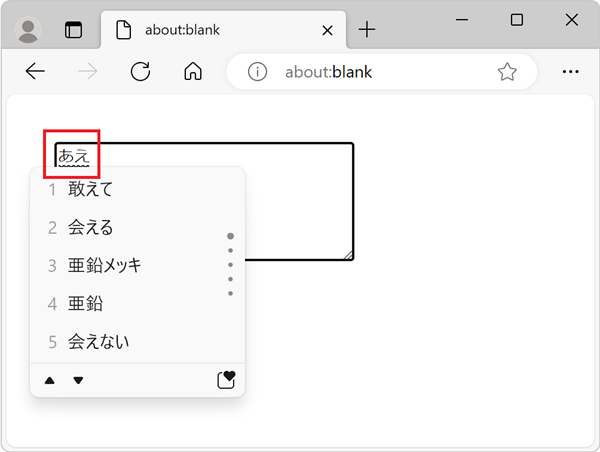
    A textarea in Microsoft Edge on Windows with some Japanese text being composed from the IME window

  • When the user selects a suggestion from the list of candidates in the IME window, the text is replaced and is underlined with a thick solid line:
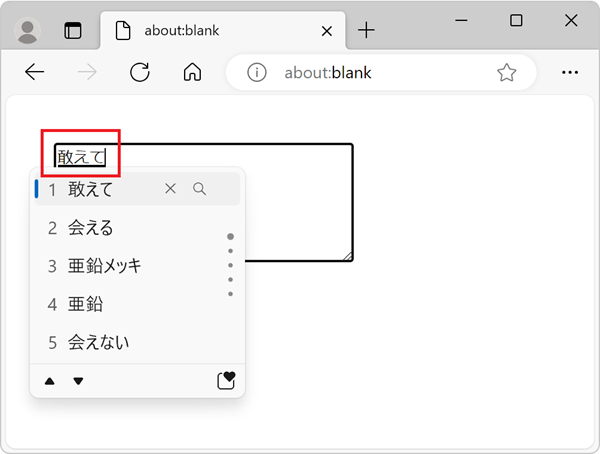
    A textarea in Microsoft Edge on Windows with some Japanese text being selected from the IME window

When creating your own custom editable region by using the EditContext API, you need to handle IME composition yourself. You should listen for the textformatupdate event, which gives you the list of text formats that the IME window wants to apply to the text being composed. You should then update the formatting of the text displayed in your editable region accordingly.

Constructor

TextFormat()

Returns a new TextFormat instance.

Instance properties

TextFormat.rangeStart Read only

The start position of the text range that needs to be formatted with the given text format.

TextFormat.rangeEnd Read only

The end position of the text range that needs to be formatted with the given text format.

TextFormat.underlineStyle Read only

The style of the underline that needs to be applied to the text range that is being formatted.

TextFormat.underlineThickness Read only

The thickness of the underline that needs to be applied to the text range that is being formatted.

Examples

Using the textformatupdate event

In the following example, the textformatupdate event is used to log the various formats that the IME composition window wants to apply to text ranges in the editable element. Note that the event listener callback in this example is only called when using an IME window to compose text.

html
<div id="editor"></div>
js
const editorEl = document.getElementById("editor");
const editContext = new EditContext(editorEl);
editorEl.editContext = editContext;

editContext.addEventListener("textformatupdate", (e) => {
  // Get the TextFormat instances.
  const formats = e.getTextFormats();

  // Iterate over the TextFormat instances.
  for (const format of formats) {
    console.log(
      `Applying a ${format.underlineThickness} ${format.underlineStyle} underline between ${format.rangeStart} and ${format.rangeEnd}.`,
    );
  }
});

Specifications

Specification
EditContext API
# dom-textformat

Browser compatibility

desktop mobile
Chrome
Edge
Firefox
Opera
Safari
Chrome Android
Firefox for Android
Opera Android
Safari on iOS
Samsung Internet
WebView Android
WebView on iOS
TextFormat
Experimental
Chrome – Full support
Chrome 121 (Release date: 2024-01-23)
footnote Full support
Edge – Full support
Edge 121 (Release date: 2024-01-25)
footnote Full support
Firefox – No support
Firefox
footnote
footnote See bug 1904161
Opera – Full support
Opera 107 (Release date: 2024-02-07)
footnote Full support
Safari – No support
Safari
footnote
footnote See bug 269922
Chrome Android – Full support
Chrome Android 121 (Release date: 2024-01-23)
footnote Full support
Firefox for Android – No support
Firefox for Android
footnote
footnote See bug 1904161
Opera Android – Full support
Opera Android 81 (Release date: 2024-03-14)
footnote Full support
Safari on iOS – No support
Safari on iOS
footnote
footnote See bug 269922
Samsung Internet – Full support
Samsung Internet 25 (Release date: 2024-04-24)
footnote Full support
WebView Android – Full support
WebView Android 121 (Release date: 2024-01-23)
footnote Full support
WebView on iOS – No support
WebView on iOS
footnote
footnote See bug 269922
TextFormat() constructor
Experimental
Chrome – Full support
Chrome 121 (Release date: 2024-01-23)
footnote Full support
Edge – Full support
Edge 121 (Release date: 2024-01-25)
footnote Full support
Firefox – No support
Firefox
footnote No support
Opera – Full support
Opera 107 (Release date: 2024-02-07)
footnote Full support
Safari – No support
Safari
footnote No support
Chrome Android – Full support
Chrome Android 121 (Release date: 2024-01-23)
footnote Full support
Firefox for Android – No support
Firefox for Android
footnote No support
Opera Android – Full support
Opera Android 81 (Release date: 2024-03-14)
footnote Full support
Safari on iOS – No support
Safari on iOS
footnote No support
Samsung Internet – Full support
Samsung Internet 25 (Release date: 2024-04-24)
footnote Full support
WebView Android – Full support
WebView Android 121 (Release date: 2024-01-23)
footnote Full support
WebView on iOS – No support
WebView on iOS
footnote No support
rangeEnd
Experimental
Chrome – Full support
Chrome 121 (Release date: 2024-01-23)
footnote Full support
Edge – Full support
Edge 121 (Release date: 2024-01-25)
footnote Full support
Firefox – No support
Firefox
footnote No support
Opera – Full support
Opera 107 (Release date: 2024-02-07)
footnote Full support
Safari – No support
Safari
footnote No support
Chrome Android – Full support
Chrome Android 121 (Release date: 2024-01-23)
footnote Full support
Firefox for Android – No support
Firefox for Android
footnote No support
Opera Android – Full support
Opera Android 81 (Release date: 2024-03-14)
footnote Full support
Safari on iOS – No support
Safari on iOS
footnote No support
Samsung Internet – Full support
Samsung Internet 25 (Release date: 2024-04-24)
footnote Full support
WebView Android – Full support
WebView Android 121 (Release date: 2024-01-23)
footnote Full support
WebView on iOS – No support
WebView on iOS
footnote No support
rangeStart
Experimental
Chrome – Full support
Chrome 121 (Release date: 2024-01-23)
footnote Full support
Edge – Full support
Edge 121 (Release date: 2024-01-25)
footnote Full support
Firefox – No support
Firefox
footnote No support
Opera – Full support
Opera 107 (Release date: 2024-02-07)
footnote Full support
Safari – No support
Safari
footnote No support
Chrome Android – Full support
Chrome Android 121 (Release date: 2024-01-23)
footnote Full support
Firefox for Android – No support
Firefox for Android
footnote No support
Opera Android – Full support
Opera Android 81 (Release date: 2024-03-14)
footnote Full support
Safari on iOS – No support
Safari on iOS
footnote No support
Samsung Internet – Full support
Samsung Internet 25 (Release date: 2024-04-24)
footnote Full support
WebView Android – Full support
WebView Android 121 (Release date: 2024-01-23)
footnote Full support
WebView on iOS – No support
WebView on iOS
footnote No support
underlineStyle
Experimental
Chrome – Full support
Chrome 121 (Release date: 2024-01-23)
footnote Full support
Edge – Full support
Edge 121 (Release date: 2024-01-25)
footnote Full support
Firefox – No support
Firefox
footnote No support
Opera – Full support
Opera 107 (Release date: 2024-02-07)
footnote Full support
Safari – No support
Safari
footnote No support
Chrome Android – Full support
Chrome Android 121 (Release date: 2024-01-23)
footnote Full support
Firefox for Android – No support
Firefox for Android
footnote No support
Opera Android – Full support
Opera Android 81 (Release date: 2024-03-14)
footnote Full support
Safari on iOS – No support
Safari on iOS
footnote No support
Samsung Internet – Full support
Samsung Internet 25 (Release date: 2024-04-24)
footnote Full support
WebView Android – Full support
WebView Android 121 (Release date: 2024-01-23)
footnote Full support
WebView on iOS – No support
WebView on iOS
footnote No support
underlineThickness
Experimental
Chrome – Full support
Chrome 121 (Release date: 2024-01-23)
footnote Full support
Edge – Full support
Edge 121 (Release date: 2024-01-25)
footnote Full support
Firefox – No support
Firefox
footnote No support
Opera – Full support
Opera 107 (Release date: 2024-02-07)
footnote Full support
Safari – No support
Safari
footnote No support
Chrome Android – Full support
Chrome Android 121 (Release date: 2024-01-23)
footnote Full support
Firefox for Android – No support
Firefox for Android
footnote No support
Opera Android – Full support
Opera Android 81 (Release date: 2024-03-14)
footnote Full support
Safari on iOS – No support
Safari on iOS
footnote No support
Samsung Internet – Full support
Samsung Internet 25 (Release date: 2024-04-24)
footnote Full support
WebView Android – Full support
WebView Android 121 (Release date: 2024-01-23)
footnote Full support
WebView on iOS – No support
WebView on iOS
footnote No support

Legend

Tip: you can click/tap on a cell for more information.

Full support
Full support
No support
No support
Experimental. Expect behavior to change in the future.
See implementation notes.