EditContext: textformatupdate event
Limited availability
This feature is not Baseline because it does not work in some of the most widely-used browsers.
Experimental: This is an experimental technology
Check the Browser compatibility table carefully before using this in production.
The textformatupdate event of the EditContext interface fires when composition using an Input Method Editor (IME) window is happening.
The event is fired when the IME decides that certain parts of the text being composed should be formatted differently to indicate the composition state.
The following screenshot shows an example of text being written in the Notepad app on Windows, by using the Japanese IME. The text is formatted with a thick underline to indicate that it's been composed from one of the IME's suggestions.
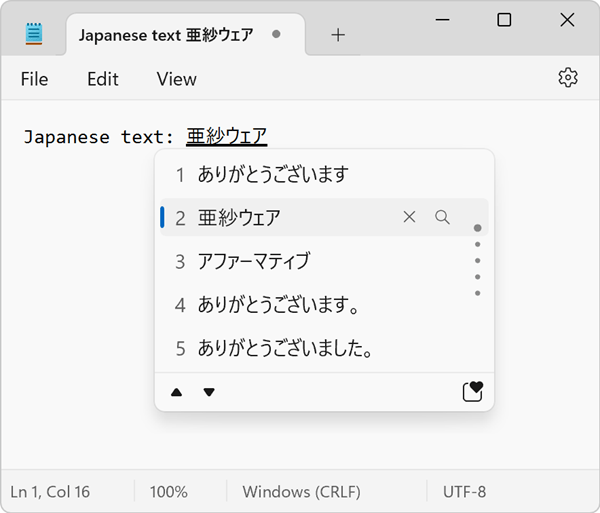
As a web developer, you should listen for the textformatupdate event and update the formatting of the text displayed in your editable region accordingly.
Syntax
Use the event name in methods like addEventListener(), or set an event handler property.
addEventListener("textformatupdate", (event) => { })

ontextformatupdate = (event) => { }
Event type
A TextFormatUpdateEvent. Inherits from Event.
Event properties
In addition to the properties listed below, properties from the parent interface, Event, are available.
TextFormatUpdateEvent.getTextFormats-
Returns the list of text formats that the IME window wants to apply to the text.
Examples
Rendering IME composition text formatting
In the following example, the textformatupdate event is used to update the formatting of the text in the editable region. Note that the event listener callback in this example is only called when using an IME window, or other platform-specific editing UI surfaces, to compose text.
<canvas id="editor-canvas"></canvas>
const TEXT_X = 10;
const TEXT_Y = 10;

const canvas = document.getElementById("editor-canvas");
const ctx = canvas.getContext("2d");

const editContext = new EditContext();
canvas.editContext = editContext;

editContext.addEventListener("textformatupdate", (e) => {
  // Clear the canvas.
  ctx.clearRect(0, 0, canvas.width, canvas.height);

  // Render the text.
  ctx.fillText(editContext.text, TEXT_X, TEXT_Y);

  // Get the text formats that the IME window wants to apply.
  const formats = e.getTextFormats();

  // Iterate over the text formats
  for (const format of formats) {
    const { rangeStart, rangeEnd, underlineStyle, underlineThickness } = format;

    const underlineXStart = ctx.measureText(
      editContext.text.substring(0, rangeStart),
    ).width;
    const underlineXEnd = ctx.measureText(
      editContext.text.substring(0, rangeEnd),
    ).width;
    const underlineY = TEXT_Y + 3;

    // For brevity, this example only draws a simple underline.
    // You should use the underlineStyle and underlineThickness values to draw the underline.

    ctx.beginPath();
    ctx.moveTo(TEXT_X + underlineXStart, underlineY);
    ctx.lineTo(TEXT_X + underlineXEnd, underlineY);
    ctx.stroke();
  }
});
Specifications
| Specification |
|---|
| EditContext API # dom-editcontext-ontextformatupdate |
Browser compatibility
| desktop | mobile | |||||||||||
|---|---|---|---|---|---|---|---|---|---|---|---|---|
textformatupdate event
|
|
|
|
|
|
|
|
|
|
|
|
|
Legend
Tip: you can click/tap on a cell for more information.
- Full support
- Full support
- No support
- No support
- Experimental. Expect behavior to change in the future.