XRInputSource

Limited availability

This feature is not Baseline because it does not work in some of the most widely-used browsers.

Secure context: This feature is available only in secure contexts (HTTPS), in some or all supporting browsers.

The WebXR Device API's XRInputSource interface describes a single source of control input which is part of the user's WebXR-compatible virtual or augmented reality system. The device is specific to the platform being used, but provides the direction in which it is being aimed and optionally may generate events if the user triggers performs actions using the device.

Instance properties

gamepad Read only

A Gamepad object describing the state of the buttons and axes on the XR input source, if it is a gamepad or comparable device. If the device isn't a gamepad-like device, this property's value is null.

gripSpace Read only

An XRSpace whose origin tracks the pose which is used to render objects which should appear as if they're held in the hand indicated by handedness. The orientation of this space indicates the angle at which the hand is gripping the object. Read on in the main article on gripSpace for more details on how to use this space.

hand Read only

An XRHand object providing access to the underlying hand-tracking device.

handedness Read only

A string that indicates which hand the device represented by this XRInputSource is being used in, if any. The value will be left, right, or none.

profiles Read only

An array of strings, each specifying the name of an input profile describing the preferred visual representation and behavior of this input source.

targetRayMode Read only

A string indicating the methodology used to produce the target ray: gaze, tracked-pointer, or screen.

targetRaySpace Read only

An XRSpace object defining the origin of the target ray and the direction in which it extends. This space is established using the method defined by targetRayMode.

Instance methods

The XRInputSource interface defines no methods.

Usage notes

Actions and the target ray

If the device provides an indication of the direction in which it is pointed, this is done using a target ray. This is a ray extending from the position of the device outward in the direction in which it is pointed.

A target ray emitted by a hand controller.
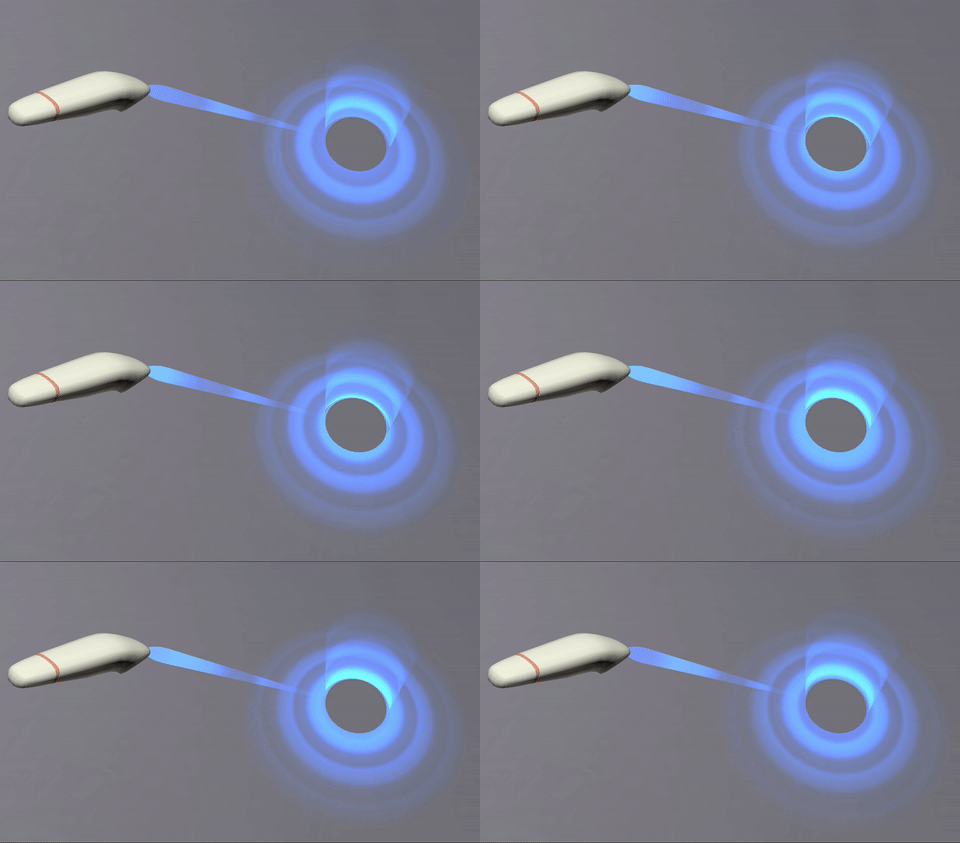
A screenshot showing a target ray being emitted by a hand controller

If the device includes a trigger or other squeezable input, such as a hand gesture device that recognizes when the user squeezes their fist, that action is called a primary squeeze action. A primary squeeze action should correspond to a gripping act in reality, such as taking hold of an object or pressing a trigger on a tool or weapon. When a squeeze action begins, such as by the user pressing the trigger or tightening their grip, a squeezestart event is sent to the XRSession. Once the action is completed and the user has released the trigger or the grip, a squeeze event is sent. This is followed by a squeezeend, which is also sent if the action is aborted rather than completed.

If the device has a button or other pressable input control, it is a primary input source, and this button is a primary action. A primary action may occur when the user presses a button, clicks on a touchpad or the top button of a thumb stick, or uses a hand gesture or spoken command that invokes the button-like action. When a primary action begins, a selectstart event is sent to the XRSession. When the action has completed (such as when the user releases the button), a select event is sent. Finally, once that is done—or if the user aborts the action—a selectend event is sent to the session object.

An action may be aborted either by the user in some device-specific fashion or if the input device is disconnected before the action is completed.

Local coordinate system

Each input source has its own local coordinate system, which is described by the gripSpace property, which is an XRSpace used to map the input's coordinate system into the world coordinate system. The grip space's coordinate system can then be used to render objects so they appear to be held in the user's hand.
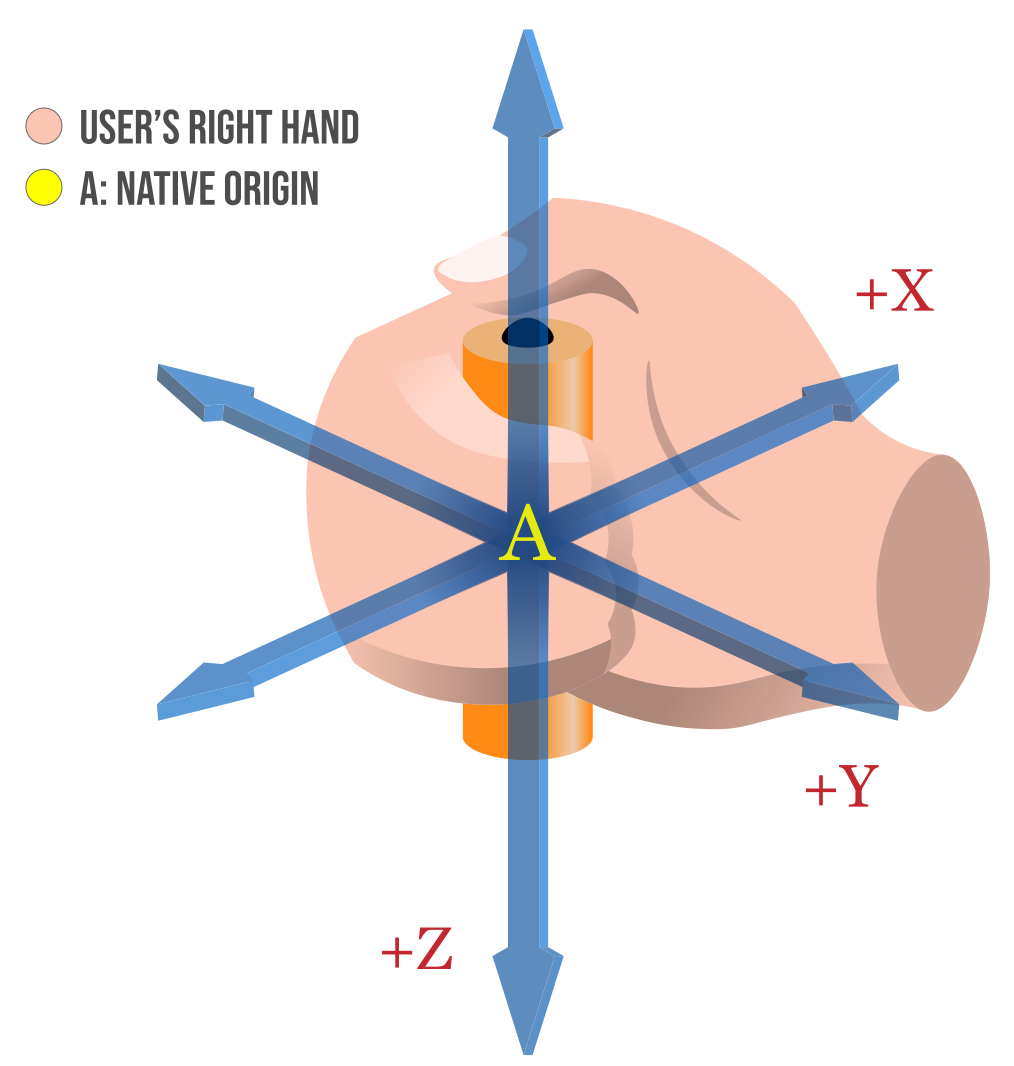
A diagram showing the coordinate system defined by the gripSpace property

For more details on the input source's coordinate system, see the article that covers the gripSpace property in detail.

Specifications

Specification
WebXR Device API
# xrinputsource-interface

Browser compatibility

desktop mobile
Chrome
Edge
Firefox
Opera
Safari
Chrome Android
Firefox for Android
Opera Android
Safari on iOS
Samsung Internet
WebView Android
WebView on iOS
XRInputSource
Chrome – Full support
Chrome 79 (Release date: 2019-12-10)
footnote Full support
Edge – Full support
Edge 79 (Release date: 2020-01-15)
footnote Full support
Firefox – No support
Firefox
footnote No support
Opera – Full support
Opera 66 (Release date: 2020-01-07)
footnote Full support
Safari – No support
Safari
footnote No support
Chrome Android – Full support
Chrome Android 79 (Release date: 2019-12-17)
footnote Full support
Firefox for Android – No support
Firefox for Android
footnote No support
Opera Android – Full support
Opera Android 57 (Release date: 2020-03-30)
footnote Full support
Safari on iOS – No support
Safari on iOS
footnote No support
Samsung Internet – Full support
Samsung Internet 11.2 (Release date: 2020-03-22)
footnote Full support
WebView Android – No support
WebView Android
footnote
footnote See bug 40652382
WebView on iOS – No support
WebView on iOS
footnote No support
gamepad
Chrome – Full support
Chrome 79 (Release date: 2019-12-10)
footnote Full support
Edge – Full support
Edge 79 (Release date: 2020-01-15)
footnote Full support
Firefox – No support
Firefox
footnote No support
Opera – Full support
Opera 66 (Release date: 2020-01-07)
footnote Full support
Safari – No support
Safari
footnote No support
Chrome Android – Full support
Chrome Android 79 (Release date: 2019-12-17)
footnote Full support
Firefox for Android – No support
Firefox for Android
footnote No support
Opera Android – Full support
Opera Android 57 (Release date: 2020-03-30)
footnote Full support
Safari on iOS – No support
Safari on iOS
footnote No support
Samsung Internet – Full support
Samsung Internet 11.2 (Release date: 2020-03-22)
footnote Full support
WebView Android – No support
WebView Android
footnote No support
WebView on iOS – No support
WebView on iOS
footnote No support
gripSpace
Chrome – Full support
Chrome 79 (Release date: 2019-12-10)
footnote Full support
Edge – Full support
Edge 79 (Release date: 2020-01-15)
footnote Full support
Firefox – No support
Firefox
footnote No support
Opera – Full support
Opera 66 (Release date: 2020-01-07)
footnote Full support
Safari – No support
Safari
footnote No support
Chrome Android – Full support
Chrome Android 79 (Release date: 2019-12-17)
footnote Full support
Firefox for Android – No support
Firefox for Android
footnote No support
Opera Android – Full support
Opera Android 57 (Release date: 2020-03-30)
footnote Full support
Safari on iOS – No support
Safari on iOS
footnote No support
Samsung Internet – Full support
Samsung Internet 11.2 (Release date: 2020-03-22)
footnote Full support
WebView Android – No support
WebView Android
footnote No support
WebView on iOS – No support
WebView on iOS
footnote No support
hand
Chrome – Full support
Chrome 131 (Release date: 2024-11-12)
footnote Full support
Edge – No support
Edge 93 – 110 (Release date: 2021-09-02)
footnote Removed in 111 and later
footnote Hololens 2 only.
Firefox – No support
Firefox
footnote No support
Opera – Full support
Opera 116 (Release date: 2025-01-08)
footnote Full support
Safari – No support
Safari
footnote No support
Chrome Android – Full support
Chrome Android 131 (Release date: 2024-11-12)
footnote Full support
Firefox for Android – No support
Firefox for Android
footnote No support
Opera Android – Full support
Opera Android 87 (Release date: 2025-01-22)
footnote Full support
Safari on iOS – No support
Safari on iOS
footnote No support
Samsung Internet – Full support
Samsung Internet 29 (Release date: 2025-10-25)
footnote Full support
WebView Android – No support
WebView Android
footnote No support
WebView on iOS – No support
WebView on iOS
footnote No support
handedness
Chrome – Full support
Chrome 79 (Release date: 2019-12-10)
footnote Full support
Edge – Full support
Edge 79 (Release date: 2020-01-15)
footnote Full support
Firefox – No support
Firefox
footnote No support
Opera – Full support
Opera 66 (Release date: 2020-01-07)
footnote Full support
Safari – No support
Safari
footnote No support
Chrome Android – Full support
Chrome Android 79 (Release date: 2019-12-17)
footnote Full support
Firefox for Android – No support
Firefox for Android
footnote No support
Opera Android – Full support
Opera Android 57 (Release date: 2020-03-30)
footnote Full support
Safari on iOS – No support
Safari on iOS
footnote No support
Samsung Internet – Full support
Samsung Internet 11.2 (Release date: 2020-03-22)
footnote Full support
WebView Android – No support
WebView Android
footnote No support
WebView on iOS – No support
WebView on iOS
footnote No support
profiles
Chrome – Full support
Chrome 79 (Release date: 2019-12-10)
footnote Full support
Edge – Full support
Edge 79 (Release date: 2020-01-15)
footnote Full support
Firefox – No support
Firefox
footnote No support
Opera – Full support
Opera 66 (Release date: 2020-01-07)
footnote Full support
Safari – No support
Safari
footnote No support
Chrome Android – Full support
Chrome Android 79 (Release date: 2019-12-17)
footnote Full support
Firefox for Android – No support
Firefox for Android
footnote No support
Opera Android – Full support
Opera Android 57 (Release date: 2020-03-30)
footnote Full support
Safari on iOS – No support
Safari on iOS
footnote No support
Samsung Internet – Full support
Samsung Internet 11.2 (Release date: 2020-03-22)
footnote Full support
WebView Android – No support
WebView Android
footnote No support
WebView on iOS – No support
WebView on iOS
footnote No support
skipRendering
Experimental
Chrome – No support
Chrome
footnote No support
Edge – No support
Edge
footnote No support
Firefox – No support
Firefox
footnote No support
Opera – No support
Opera
footnote No support
Safari – No support
Safari
footnote No support
Chrome Android – No support
Chrome Android
footnote No support
Firefox for Android – No support
Firefox for Android
footnote No support
Opera Android – No support
Opera Android
footnote No support
Safari on iOS – No support
Safari on iOS
footnote No support
Samsung Internet – No support
Samsung Internet
footnote No support
WebView Android – No support
WebView Android
footnote No support
WebView on iOS – No support
WebView on iOS
footnote No support
targetRayMode
Chrome – Full support
Chrome 79 (Release date: 2019-12-10)
footnote Full support
Edge – Full support
Edge 79 (Release date: 2020-01-15)
footnote Full support
Firefox – No support
Firefox
footnote No support
Opera – Full support
Opera 66 (Release date: 2020-01-07)
footnote Full support
Safari – No support
Safari
footnote No support
Chrome Android – Full support
Chrome Android 79 (Release date: 2019-12-17)
footnote Full support
Firefox for Android – No support
Firefox for Android
footnote No support
Opera Android – Full support
Opera Android 57 (Release date: 2020-03-30)
footnote Full support
Safari on iOS – No support
Safari on iOS
footnote No support
Samsung Internet – Full support
Samsung Internet 11.2 (Release date: 2020-03-22)
footnote Full support
WebView Android – No support
WebView Android
footnote No support
WebView on iOS – No support
WebView on iOS
footnote No support
targetRaySpace
Chrome – Full support
Chrome 79 (Release date: 2019-12-10)
footnote Full support
Edge – Full support
Edge 79 (Release date: 2020-01-15)
footnote Full support
Firefox – No support
Firefox
footnote No support
Opera – Full support
Opera 66 (Release date: 2020-01-07)
footnote Full support
Safari – No support
Safari
footnote No support
Chrome Android – Full support
Chrome Android 79 (Release date: 2019-12-17)
footnote Full support
Firefox for Android – No support
Firefox for Android
footnote No support
Opera Android – Full support
Opera Android 57 (Release date: 2020-03-30)
footnote Full support
Safari on iOS – No support
Safari on iOS
footnote No support
Samsung Internet – Full support
Samsung Internet 11.2 (Release date: 2020-03-22)
footnote Full support
WebView Android – No support
WebView Android
footnote No support
WebView on iOS – No support
WebView on iOS
footnote No support

Legend

Tip: you can click/tap on a cell for more information.

Full support
Full support
No support
No support
Experimental. Expect behavior to change in the future.
See implementation notes.

See also