console: timeEnd() static method
Baseline
Widely available
This feature is well established and works across many devices and browser versions. It’s been available across browsers since July 2015.
Note: This feature is available in Web Workers.
The console.timeEnd() static method stops a timer that was previously started by calling console.time().
See Timers in the documentation for details and examples.
Syntax
console.timeEnd()
console.timeEnd(label)
Parameters
labelOptional-
A string representing the name of the timer to stop. Once stopped, the elapsed time is automatically displayed in the console along with an indicator that the time has ended. If omitted, the label "default" is used.
Return value
None (undefined).
Examples
console.time("answer time");
alert("Click to continue");
console.timeLog("answer time");
alert("Do a bunch of other stuff…");
console.timeEnd("answer time");
The output from the example above shows the time taken by the user to dismiss the first alert box, followed by the cumulative time it took for the user to dismiss both alerts:
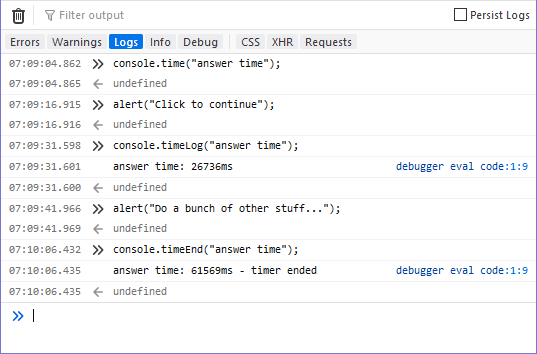
Notice that the timer's name is displayed when the timer value is logged using console.timeLog() and again when it's stopped. In addition, the call to console.timeEnd() has the additional information, "timer ended" to make it obvious that the timer is no
longer tracking time.
Specifications
| Specification |
|---|
| Console # timeend |
Browser compatibility
| desktop | mobile | server | |||||||||||||
|---|---|---|---|---|---|---|---|---|---|---|---|---|---|---|---|
timeEnd() static method
|
|
|
|
|
|
|
|
|
|
|
|
|
|
|
|
Legend
Tip: you can click/tap on a cell for more information.
- Full support
- Full support