Set.prototype.difference()
Baseline
2024
Newly available
Since June 2024, this feature works across the latest devices and browser versions. This feature might not work in older devices or browsers.
The difference() method of Set instances takes a set and returns a new set containing elements in this set but not in the given set.
Syntax
difference(other)
Parameters
Return value
A new Set object containing elements in this set but not in the other set.
Description
In mathematical notation, difference is defined as:
And using Venn diagram:
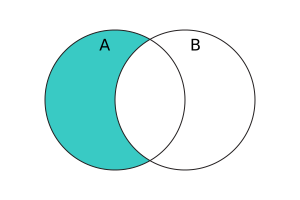
difference() accepts set-like objects as the other parameter. It requires this to be an actual Set instance, because it directly retrieves the underlying data stored in this without invoking any user code. Then, its behavior depends on the sizes of this and other:
- If there are more elements in
thisthanother.size, then it iterates overotherby calling itskeys()method, and constructs a new set with all elements inthisthat are not seen inother. - Otherwise, it iterates over the elements in
this, and constructs a new set with all elementseinthisthat causeother.has(e)to return a falsy value.
The order of elements in the returned set is the same as in this.
Examples
Using difference()
The following example computes the difference between the set of odd numbers (<10) and the set of perfect squares (<10). The result is the set of odd numbers that are not perfect squares.
const odds = new Set([1, 3, 5, 7, 9]);
const squares = new Set([1, 4, 9]);
console.log(odds.difference(squares)); // Set(3) { 3, 5, 7 }
Specifications
| Specification |
|---|
| ECMAScript® 2027 Language Specification # sec-set.prototype.difference |
Browser compatibility
| desktop | mobile | server | |||||||||||||
|---|---|---|---|---|---|---|---|---|---|---|---|---|---|---|---|
difference
|
|
|
|
|
|
|
|
|
|
|
|
|
|
|
|
Legend
Tip: you can click/tap on a cell for more information.
- Full support
- Full support