HTMLImageElement: x property
Baseline
Widely available
This feature is well established and works across many devices and browser versions. It’s been available across browsers since July 2015.
The read-only x property of the HTMLImageElement interface indicates the x-coordinate of the <img> element's left border edge relative to the root element's origin.
The x and y properties are only valid for an image if its display property has the computed value table-column or table-column-group. In other words: it has either of those values set explicitly on it, or it has inherited it from a containing element, or by being located within a column described by either <col> or <colgroup>.
Value
An integer value indicating the distance in pixels from the left edge of the element's nearest root element and the left edge of the <img> element's border box. The nearest root element is the outermost <html> element that contains the image. If the image is in an <iframe>, its x is relative to that frame.
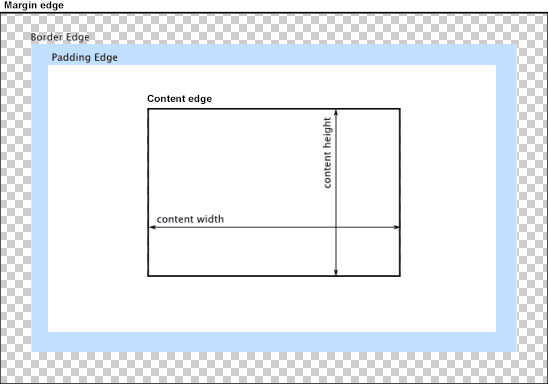
In the diagram below, the left border edge is the left edge of the blue padding area. So the value returned by x would be the distance from that point to the left edge of the content area.
Example
The example below demonstrates the use of the HTMLImageElement properties x and y.
HTML
In this example, we see a table showing information about users of a website, including their user ID, their full name, and their avatar image.
<table id="userinfo">
  <colgroup>
    <col span="2" class="group1" />
    <col />
  </colgroup>
  <thead>
    <tr>
      <th>UserID</th>
      <th>Name</th>
      <th>Avatar</th>
    </tr>
  </thead>
  <tbody>
    <tr>
      <td>12345678</td>
      <td>Johnny Rocket</td>
      <td>
        <img src="/shared-assets/images/examples/grapefruit-slice.jpg" />
      </td>
    </tr>
  </tbody>
</table>
<pre id="log"></pre>
JavaScript
The JavaScript code that fetches the image from the table and looks up its x and y values is below.
const logBox = document.querySelector("pre");
const tbl = document.getElementById("userinfo");

const log = (msg) => {
  logBox.innerText += `${msg}\n`;
};

const cell = tbl.rows[1].cells[2];
const image = cell.querySelector("img");

log(`Image's global X: ${image.x}`);
log(`Image's global Y: ${image.y}`);
This uses the <table>'s rows property to get a list of the rows in the table, from which it looks up row 1 (which, being a zero-based index, means the second row from the top). Then it looks at that <tr> (table row) element's cells property to get a list of the cells in that row. The third cell is taken from that row (once again, specifying 2 as the zero-based offset).
From there, we can get the <img> element itself from the cell by calling querySelector() on the HTMLTableCellElement representing that cell.
Finally, we can look up and display the values of the HTMLImageElement's x and y properties.
CSS
The CSS defining the appearance of the table:
.group1 {
  background-color: #d7d9f2;
}

table {
  border-collapse: collapse;
  border: 2px solid rgb(100 100 100);
  font-family: sans-serif;
}

td,
th {
  border: 1px solid rgb(100 100 100);
  padding: 10px 14px;
}

td > img {
  max-width: 4em;
}
Result
The resulting table looks like this:
Specifications
| Specification |
|---|
| CSSOM View Module # dom-htmlimageelement-x |
Browser compatibility
| desktop | mobile | |||||||||||
|---|---|---|---|---|---|---|---|---|---|---|---|---|
x
|
|
|
|
|
|
|
|
|
|
|
|
|
Legend
Tip: you can click/tap on a cell for more information.
- Full support
- Full support
- Has more compatibility info.