HTMLImageElement: y property
Baseline
Widely available
This feature is well established and works across many devices and browser versions. It’s been available across browsers since July 2015.
The read-only y property of the HTMLImageElement interface indicates the y-coordinate of the <img> element's top border edge relative to the root element's origin.
The x and y properties are only valid for an image if its display property has the computed value table-column or table-column-group. In other words: it has either of those values set explicitly on it, or it has inherited it from a containing element, or by being located within a column described by either <col> or <colgroup>.
Value
An integer value indicating the distance in pixels from the top edge of the element's nearest root element to the top edge of the <img> element's border box. The nearest root element is the outermost <html> element that contains the image. If the image is in an <iframe>, its y is relative to that frame.
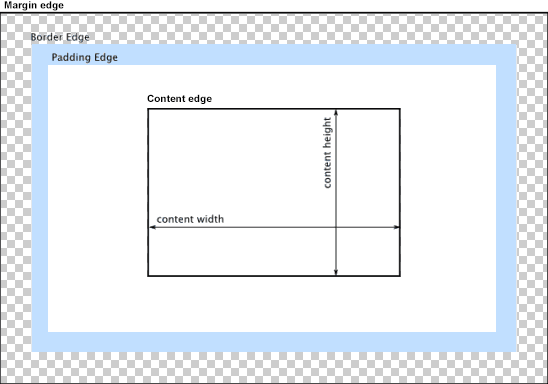
In the diagram below, the top border edge is the top edge of the blue padding area. So the value returned by y would be the distance from that point to the top edge of the content area.
Example
See HTMLImageElement.x for example code that demonstrates the use of the HTMLImageElement.y (and HTMLImageElement.x).
Specifications
| Specification |
|---|
| CSSOM View Module # dom-htmlimageelement-y |
Browser compatibility
| desktop | mobile | |||||||||||
|---|---|---|---|---|---|---|---|---|---|---|---|---|
y
|
|
|
|
|
|
|
|
|
|
|
|
|
Legend
Tip: you can click/tap on a cell for more information.
- Full support
- Full support
- Has more compatibility info.