Window: innerHeight property
Baseline
Widely available
This feature is well established and works across many devices and browser versions. It’s been available across browsers since July 2015.
The read-only innerHeight property of the
Window interface returns the interior height of the window in pixels,
including the height of the horizontal scroll bar, if present.
The value of innerHeight is taken from the height of the window's
layout viewport. The width can be obtained using the
innerWidth property.
Value
An integer value indicating the window's layout viewport height in pixels. The property is read only and has no default value.
To change the height of the window, call one of its resize methods, such as
resizeTo() or resizeBy().
Usage notes
To obtain the height of the window minus its horizontal scroll bar and any borders, use
the root <html> element's clientHeight property instead.
Both innerHeight and innerWidth are available on any window
or any object that behaves like a window, such as a tab or frame.
Examples
Assuming a frameset
console.log(window.innerHeight); // or

console.log(self.innerHeight);
// will log the height of the frame viewport within the frameset

console.log(parent.innerHeight);
// will log the height of the viewport of the closest frameset

console.log(top.innerHeight);
// will log the height of the viewport of the outermost frameset
To change the size of a window, see window.resizeBy() and
window.resizeTo().
To get the outer height of a window, i.e., the height of the whole browser window, see
window.outerHeight.
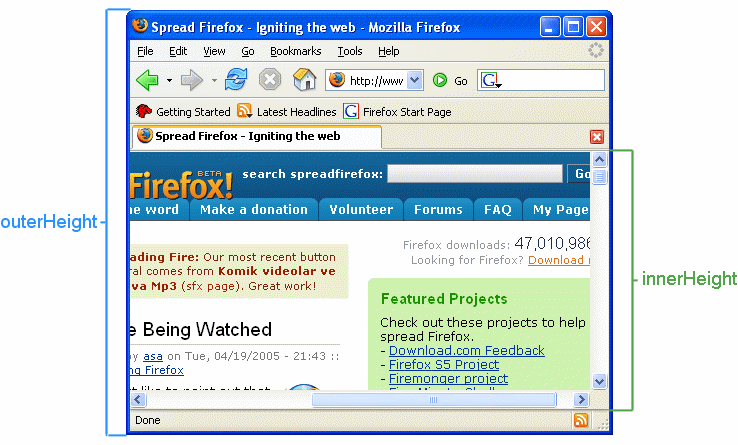
Graphical example
The following figure shows the difference between outerHeight and
innerHeight.
Demo
HTML
<p>Resize the browser window to fire the <code>resize</code> event.</p>
<p>Window height: <span id="height"></span></p>
<p>Window width: <span id="width"></span></p>
JavaScript
const heightOutput = document.querySelector("#height");
const widthOutput = document.querySelector("#width");

function updateSize() {
  heightOutput.textContent = window.innerHeight;
  widthOutput.textContent = window.innerWidth;
}

updateSize();
window.addEventListener("resize", updateSize);
Result
You can also view the results of the demo code in a separate page.
Specifications
| Specification |
|---|
| CSSOM View Module # dom-window-innerheight |
Browser compatibility
| desktop | mobile | server | |||||||||||
|---|---|---|---|---|---|---|---|---|---|---|---|---|---|
innerHeight
|
|
|
|
|
|
|
|
|
|
|
|
|
|
Legend
Tip: you can click/tap on a cell for more information.
- Full support
- Full support
- No support
- No support
- See implementation notes.