Window: alert() method

Baseline Widely available

This feature is well established and works across many devices and browser versions. It’s been available across browsers since July 2015.

window.alert() instructs the browser to display a dialog with an optional message, and to wait until the user dismisses the dialog.

Under some conditions — for example, when the user switches tabs — the browser may not actually display a dialog, or may not wait for the user to dismiss the dialog.

Syntax

js
alert()
alert(message)

Parameters

message Optional

A string you want to display in the alert dialog, or, alternatively, an object that is converted into a string and displayed.

Return value

None (undefined).

Examples

js
window.alert("Hello world!");
alert("Hello world!");

Both produce:
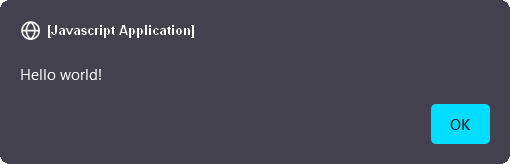
Black alert dialog box. At the top left small circle icon follow by white open and close square brackets containing this white text: JavaScript application. Below on the left, a Hello world! white text. And on the bottom right a small blue button. The button's text is: ok in black.

Notes

The alert dialog should be used for messages which do not require any response on the part of the user, other than the acknowledgement of the message.

Dialog boxes are modal windows - they prevent the user from accessing the rest of the program's interface until the dialog box is closed. For this reason, you should not overuse any function that creates a dialog box (or modal window).

Alternatively <dialog> element can be used to display alerts.

Specifications

Specification
HTML
# dom-alert-dev

Browser compatibility

desktop mobile server
Chrome
Edge
Firefox
Opera
Safari
Chrome Android
Firefox for Android
Opera Android
Safari on iOS
Samsung Internet
WebView Android
WebView on iOS
Deno
alert
Chrome – Full support
Chrome 1 (Release date: 2008-12-11)
footnote
footnote Starting with Chrome 46, this method is blocked inside an <iframe> unless its sandbox attribute has the value allow-modals.
Edge – Full support
Edge 12 (Release date: 2015-07-29)
footnote Full support
Firefox – Full support
Firefox 1 (Release date: 2004-11-09)
footnote Full support
Opera – Full support
Opera 3 (Release date: 1997-12-01)
footnote
footnote Starting with Opera 33, this method is blocked inside an <iframe> unless its sandbox attribute has the value allow-modals.
Safari – Full support
Safari 1 (Release date: 2003-06-23)
footnote Full support
Chrome Android – Full support
Chrome Android 18 (Release date: 2012-06-27)
footnote
footnote Starting with Chrome Android 46, this method is blocked inside an <iframe> unless its sandbox attribute has the value allow-modals.
Firefox for Android – Full support
Firefox for Android 4 (Release date: 2011-03-29)
footnote Full support
Opera Android – Full support
Opera Android 10.1 (Release date: 2010-11-09)
footnote
footnote Starting with Opera 33, this method is blocked inside an <iframe> unless its sandbox attribute has the value allow-modals.
Safari on iOS – Full support
Safari on iOS 1 (Release date: 2007-06-29)
footnote Full support
Samsung Internet – Full support
Samsung Internet 1 (Release date: 2013-04-27)
footnote
footnote Starting with Samsung Internet 5.0, this method is blocked inside an <iframe> unless its sandbox attribute has the value allow-modals.
WebView Android – Full support
WebView Android 4.4 (Release date: 2013-12-09)
footnote
footnote Starting with WebView Android 46, this method is blocked inside an <iframe> unless its sandbox attribute has the value allow-modals.
WebView on iOS – Full support
WebView on iOS 1 (Release date: 2007-06-29)
footnote Full support
Deno – Full support
Deno 1.5 (Release date: 2020-10-27)
footnote Full support

Legend

Tip: you can click/tap on a cell for more information.

Full support
Full support
See implementation notes.

See also