<maction>

Deprecated: This feature is no longer recommended. Though some browsers might still support it, it may have already been removed from the relevant web standards, may be in the process of being dropped, or may only be kept for compatibility purposes. Avoid using it, and update existing code if possible; see the compatibility table at the bottom of this page to guide your decision. Be aware that this feature may cease to work at any time.

The <maction> MathML element allows to bind actions to mathematical expressions. By default, only the first child is rendered but some browsers may take into account actiontype and selection attributes to implement custom behaviors.

Note: Historically, this element provided a mechanism to make MathML formulas interactive. Nowadays, it is recommended to rely on JavaScript and other Web technologies to implement this use case.

Attributes

This element's attributes include the global MathML attributes as well as the following attributes:

actiontype

The action which specifies what happens for this element. Special behavior for the following values were implemented by some browsers:

  • statusline: If there is a click on the expression or the reader moves the pointer over it, the message is sent to the browser's status line. The syntax is: <maction actiontype="statusline"> expression message </maction>.
  • toggle: When there is a click on the subexpression, the rendering alternates the display of selected subexpressions. Therefore each click increments the selection value. The syntax is: <maction actiontype="toggle" selection="positive-integer" > expression1 expression2 expressionN </maction>.
selection

The child element currently visible, only taken into account for actiontype="toggle" or non-standard actiontype values. The default value is 1, which is the first child element.

Examples

The following example uses the "toggle" actiontype:

html
<p>Try clicking this formula several times:</p>
<math display="block">
  <maction actiontype="toggle">
    <mfrac>
      <mn>6</mn>
      <mn>8</mn>
    </mfrac>

    <mfrac>
      <mrow>
        <mn>3</mn>
        <mo>×</mo>
        <mn>2</mn>
      </mrow>
      <mrow>
        <mn>4</mn>
        <mo>×</mo>
        <mn>2</mn>
      </mrow>
    </mfrac>

    <mfrac>
      <mn>3</mn>
      <mn>4</mn>
    </mfrac>
  </maction>
</math>

Sample rendering:
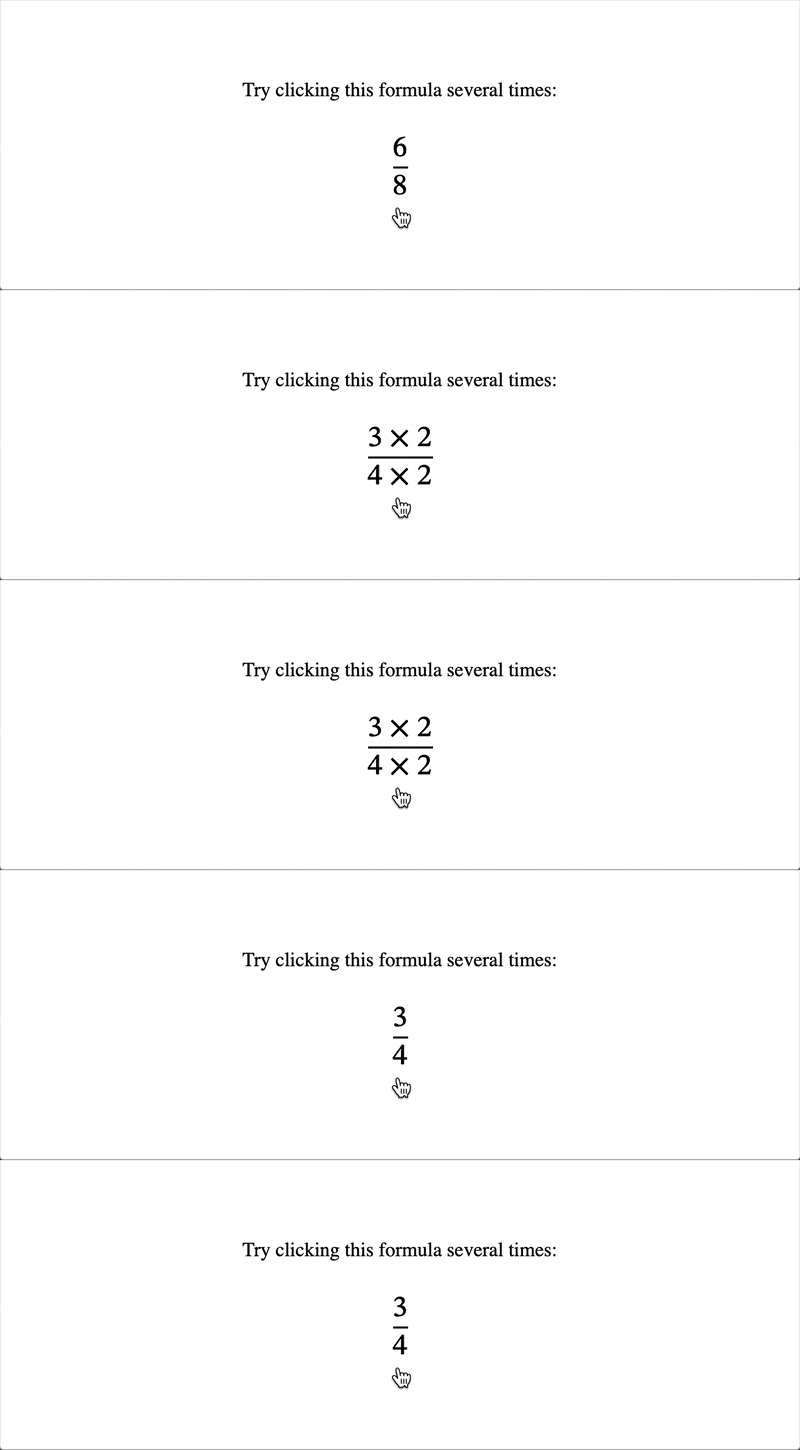
MathML toggle action example

Rendering in your browser:

Technical summary

Implicit ARIA role None

Specifications

Specification
MathML Core
# dfn-maction

Browser compatibility

desktop mobile
Chrome
Edge
Firefox
Opera
Safari
Chrome Android
Firefox for Android
Opera Android
Safari on iOS
Samsung Internet
WebView Android
WebView on iOS
maction
Deprecated
Chrome – Full support
Chrome 109 (Release date: 2023-01-10)
footnote
footnote This follows MathML Core: Only the first child is rendered while the others have their display set to none. actiontype and selection attributes are ignored.
Edge – Full support
Edge 109 (Release date: 2023-01-12)
footnote
footnote This follows MathML Core: Only the first child is rendered while the others have their display set to none. actiontype and selection attributes are ignored.
Firefox – Full support
Firefox 1 (Release date: 2004-11-09)
footnote
footnote Firefox 106 and later versions follow MathML Core: Only the first child is rendered while the others have their display set to none. actiontype and selection attributes are ignored.
Opera – Full support
Opera 95 (Release date: 2023-02-01)
footnote
footnote This follows MathML Core: Only the first child is rendered while the others have their display set to none. actiontype and selection attributes are ignored.
Safari – Full support
Safari 8 (Release date: 2014-10-16)
footnote Full support
Chrome Android – Full support
Chrome Android 109 (Release date: 2023-01-10)
footnote
footnote This follows MathML Core: Only the first child is rendered while the others have their display set to none. actiontype and selection attributes are ignored.
Firefox for Android – Full support
Firefox for Android 4 (Release date: 2011-03-29)
footnote
footnote Firefox for Android 106 and later versions follow MathML Core: Only the first child is rendered while the others have their display set to none. actiontype and selection attributes are ignored.
Opera Android – Full support
Opera Android 74 (Release date: 2023-03-13)
footnote
footnote This follows MathML Core: Only the first child is rendered while the others have their display set to none. actiontype and selection attributes are ignored.
Safari on iOS – Full support
Safari on iOS 8 (Release date: 2014-09-17)
footnote Full support
Samsung Internet – Full support
Samsung Internet 21 (Release date: 2023-05-19)
footnote
footnote This follows MathML Core: Only the first child is rendered while the others have their display set to none. actiontype and selection attributes are ignored.
WebView Android – Full support
WebView Android 109 (Release date: 2023-01-10)
footnote
footnote This follows MathML Core: Only the first child is rendered while the others have their display set to none. actiontype and selection attributes are ignored.
WebView on iOS – Full support
WebView on iOS 8 (Release date: 2014-09-17)
footnote Full support
actiontype
Deprecated Non-standard
Chrome – No support
Chrome
footnote No support
Edge – No support
Edge
footnote No support
Firefox – No support
Firefox 1 – 105 (Release date: 2004-11-09)
footnote Removed in 106 and later
Opera – No support
Opera
footnote No support
Safari – Full support
Safari 8 (Release date: 2014-10-16)
footnote Full support
Chrome Android – No support
Chrome Android
footnote No support
Firefox for Android – No support
Firefox for Android 4 – 105 (Release date: 2011-03-29)
footnote Removed in 106 and later
Opera Android – No support
Opera Android
footnote No support
Safari on iOS – Full support
Safari on iOS 8 (Release date: 2014-09-17)
footnote Full support
Samsung Internet – No support
Samsung Internet
footnote No support
WebView Android – No support
WebView Android
footnote No support
WebView on iOS – Full support
WebView on iOS 8 (Release date: 2014-09-17)
footnote Full support
actiontype="toggle"
Deprecated Non-standard
Chrome – No support
Chrome
footnote No support
Edge – No support
Edge
footnote No support
Firefox – No support
Firefox 1 – 105 (Release date: 2004-11-09)
footnote Removed in 106 and later
Opera – No support
Opera
footnote No support
Safari – Full support
Safari 8 (Release date: 2014-10-16)
footnote Full support
Chrome Android – No support
Chrome Android
footnote No support
Firefox for Android – No support
Firefox for Android 4 – 105 (Release date: 2011-03-29)
footnote Removed in 106 and later
Opera Android – No support
Opera Android
footnote No support
Safari on iOS – Full support
Safari on iOS 8 (Release date: 2014-09-17)
footnote Full support
Samsung Internet – No support
Samsung Internet
footnote No support
WebView Android – No support
WebView Android
footnote No support
WebView on iOS – Full support
WebView on iOS 8 (Release date: 2014-09-17)
footnote Full support
selection
Deprecated Non-standard
Chrome – No support
Chrome
footnote No support
Edge – No support
Edge
footnote No support
Firefox – No support
Firefox 1 – 105 (Release date: 2004-11-09)
footnote Removed in 106 and later
footnote In Firefox 15, the selection attribute is now ignored for actiontype other than toggle.
footnote In Firefox 16, the selection attribute is taken into account again when an unknown actiontype is specified.
Opera – No support
Opera
footnote No support
Safari – Full support
Safari 8 (Release date: 2014-10-16)
footnote Full support
Chrome Android – No support
Chrome Android
footnote No support
Firefox for Android – No support
Firefox for Android 4 – 105 (Release date: 2011-03-29)
footnote Removed in 106 and later
footnote In Firefox for Android 15, the selection attribute is now ignored for actiontype other than toggle.
footnote In Firefox for Android 16, the selection attribute is taken into account again when an unknown actiontype is specified.
Opera Android – No support
Opera Android
footnote No support
Safari on iOS – Full support
Safari on iOS 8 (Release date: 2014-09-17)
footnote Full support
Samsung Internet – No support
Samsung Internet
footnote No support
WebView Android – No support
WebView Android
footnote No support
WebView on iOS – Full support
WebView on iOS 8 (Release date: 2014-09-17)
footnote Full support

Legend

Tip: you can click/tap on a cell for more information.

Full support
Full support
No support
No support
Non-standard. Check cross-browser support before using.
Deprecated. Not for use in new websites.
See implementation notes.