CanvasRenderingContext2D: createLinearGradient() method
Baseline
Widely available
This feature is well established and works across many devices and browser versions. It’s been available across browsers since July 2015.
The
CanvasRenderingContext2D.createLinearGradient()
method of the Canvas 2D API creates a gradient along the line connecting two given
coordinates.
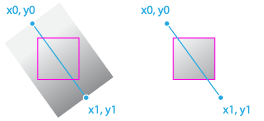
This method returns a linear CanvasGradient. To be applied to a shape,
the gradient must first be assigned to the
fillStyle or
strokeStyle properties.
Note: Gradient coordinates are global, i.e., relative to the current coordinate space. When applied to a shape, the coordinates are NOT relative to the shape's coordinates.
Syntax
createLinearGradient(x0, y0, x1, y1)
The createLinearGradient() method is specified by four parameters defining
the start and end points of the gradient line.
Parameters
Return value
A linear CanvasGradient initialized with the specified line.
Exceptions
NotSupportedErrorDOMException-
Thrown when non-finite values are passed as parameters.
Examples
Filling a rectangle with a linear gradient
This example initializes a linear gradient using the
createLinearGradient() method. Three color stops between the gradient's
start and end points are then created. Finally, the gradient is assigned to the canvas
context, and is rendered to a filled rectangle.
HTML
<canvas id="canvas"></canvas>
JavaScript
const canvas = document.getElementById("canvas");
const ctx = canvas.getContext("2d");

// Create a linear gradient
// The start gradient point is at x=20, y=0
// The end gradient point is at x=220, y=0
const gradient = ctx.createLinearGradient(20, 0, 220, 0);

// Add three color stops
gradient.addColorStop(0, "green");
gradient.addColorStop(0.5, "cyan");
gradient.addColorStop(1, "green");

// Set the fill style and draw a rectangle
ctx.fillStyle = gradient;
ctx.fillRect(20, 20, 200, 100);
Result
Specifications
| Specification |
|---|
| HTML # dom-context-2d-createlineargradient-dev |
Browser compatibility
| desktop | mobile | |||||||||||
|---|---|---|---|---|---|---|---|---|---|---|---|---|
createLinearGradient
|
|
|
|
|
|
|
|
|
|
|
|
|
Legend
Tip: you can click/tap on a cell for more information.
- Full support
- Full support
See also
- The interface defining this method:
CanvasRenderingContext2D CanvasRenderingContext2D.createRadialGradient()CanvasRenderingContext2D.createConicGradient()