CanvasRenderingContext2D: translate() method
Baseline
Widely available
This feature is well established and works across many devices and browser versions. It’s been available across browsers since July 2015.
The
CanvasRenderingContext2D.translate()
method of the Canvas 2D API adds a translation transformation to the current matrix.
Syntax
translate(x, y)
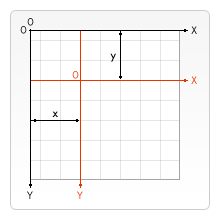
The translate() method adds a translation transformation to the current
matrix by moving the canvas and its origin x units horizontally and
y units vertically on the grid.
Parameters
Return value
None (undefined).
Examples
Moving a shape
This example draws a square that is moved from its default position by the
translate() method. An unmoved square of the same size is then drawn for
comparison.
HTML
<canvas id="canvas"></canvas>
JavaScript
The translate() method translates the context by 110 horizontally and 30
vertically. The first square is shifted by those amounts from its default position.
const canvas = document.getElementById("canvas");
const ctx = canvas.getContext("2d");

// Moved square
ctx.translate(110, 30);
ctx.fillStyle = "red";
ctx.fillRect(0, 0, 80, 80);

// Reset current transformation matrix to the identity matrix
ctx.setTransform(1, 0, 0, 1, 0, 0);

// Unmoved square
ctx.fillStyle = "gray";
ctx.fillRect(0, 0, 80, 80);
Result
The moved square is red, and the unmoved square is gray.
Specifications
| Specification |
|---|
| HTML # dom-context-2d-translate-dev |
Browser compatibility
| desktop | mobile | |||||||||||
|---|---|---|---|---|---|---|---|---|---|---|---|---|
translate
|
|
|
|
|
|
|
|
|
|
|
|
|
Legend
Tip: you can click/tap on a cell for more information.
- Full support
- Full support
See also
- The interface defining this method:
CanvasRenderingContext2D