CanvasRenderingContext2D: lineJoin property
Baseline
Widely available
This feature is well established and works across many devices and browser versions. It’s been available across browsers since July 2015.
The
CanvasRenderingContext2D.lineJoin
property of the Canvas 2D API determines the shape used to join two line segments where
they meet.
This property has no effect wherever two connected segments have the same direction, because no joining area will be added in this case. Degenerate segments with a length of zero (i.e., with all endpoints and control points at the exact same position) are also ignored.
Note:
Lines can be drawn with the
stroke(),
strokeRect(),
and strokeText() methods.
Value
There are three possible values for this property: "round", "bevel", and "miter". The default is "miter".
"round"-
Rounds off the corners of a shape by filling an additional sector of disc centered at the common endpoint of connected segments. The radius for these rounded corners is equal to the line width.
"bevel"-
Fills an additional triangular area between the common endpoint of connected segments, and the separate outside rectangular corners of each segment.
"miter"-
Connected segments are joined by extending their outside edges to connect at a single point, with the effect of filling an additional lozenge-shaped area. This setting is affected by the
miterLimitproperty. Default value.
Examples
Changing the joins in a path
This example applies rounded line joins to a path.
HTML
<canvas id="canvas"></canvas>
JavaScript
const canvas = document.getElementById("canvas");
const ctx = canvas.getContext("2d");

ctx.lineWidth = 20;
ctx.lineJoin = "round";
ctx.beginPath();
ctx.moveTo(20, 20);
ctx.lineTo(190, 100);
ctx.lineTo(280, 20);
ctx.lineTo(280, 150);
ctx.stroke();
Result
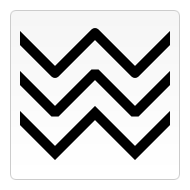
Comparison of line joins
The example below draws three different paths, demonstrating each of the three
lineJoin options.
const ctx = document.getElementById("canvas").getContext("2d");
ctx.lineWidth = 10;

["round", "bevel", "miter"].forEach((join, i) => {
  ctx.lineJoin = join;
  ctx.beginPath();
  ctx.moveTo(-5, 5 + i * 40);
  ctx.lineTo(35, 45 + i * 40);
  ctx.lineTo(75, 5 + i * 40);
  ctx.lineTo(115, 45 + i * 40);
  ctx.lineTo(155, 5 + i * 40);
  ctx.stroke();
});
Specifications
| Specification |
|---|
| HTML # dom-context-2d-linejoin-dev |
Browser compatibility
| desktop | mobile | |||||||||||
|---|---|---|---|---|---|---|---|---|---|---|---|---|
lineJoin
|
|
|
|
|
|
|
|
|
|
|
|
|
Legend
Tip: you can click/tap on a cell for more information.
- Full support
- Full support
WebKit/Blink-specific notes
- In WebKit- and Blink-based Browsers, a non-standard and deprecated method
ctx.setLineJoin()is implemented in addition to this property.
See also
- The interface defining this property:
CanvasRenderingContext2D CanvasRenderingContext2D.lineCapCanvasRenderingContext2D.lineWidth- Applying styles and color