font-smooth CSS property
Non-standard: This feature is not standardized. We do not recommend using non-standard features in production, as they have limited browser support, and may change or be removed. However, they can be a suitable alternative in specific cases where no standard option exists.
The font-smooth CSS property controls the application of anti-aliasing when fonts are rendered.
Syntax
/* Keyword values */
font-smooth: auto;
font-smooth: never;
font-smooth: always;

/* <length> value */
font-smooth: 2em;

/* Global values */
font-smooth: inherit;
font-smooth: initial;
font-smooth: revert;
font-smooth: revert-layer;
font-smooth: unset;
Note:
WebKit implements a similar property, but with different values: -webkit-font-smoothing. It only works on macOS.
auto- Let the browser decide (Uses subpixel anti-aliasing when available; this is the default)none- Turn font smoothing off; display text with jagged sharp edges.antialiased- Smooth the font on the level of the pixel, as opposed to the subpixel. Switching from subpixel rendering to anti-aliasing for light text on dark backgrounds makes it look lighter.subpixel-antialiased- On most non-retina displays, this will give the sharpest text.
Note:
Firefox implements a similar property, but with different values: -moz-osx-font-smoothing. It only works on macOS.
auto- Allow the browser to select an optimization for font smoothing, typicallygrayscale.grayscale- Render text with grayscale anti-aliasing, as opposed to the subpixel. Switching from subpixel rendering to anti-aliasing for light text on dark backgrounds makes it look lighter.
Formal definition
| Initial value | auto |
|---|---|
| Applies to | all elements |
| Inherited | yes |
| Computed value | as specified |
| Animation type | discrete |
Formal syntax
font-smooth =
  auto             |
  never            |
  always           |
  <absolute-size>  |
  <length>

<absolute-size> =
  xx-small   |
  x-small    |
  small      |
  medium     |
  large      |
  x-large    |
  xx-large   |
  xxx-large
Examples
Basic usage example
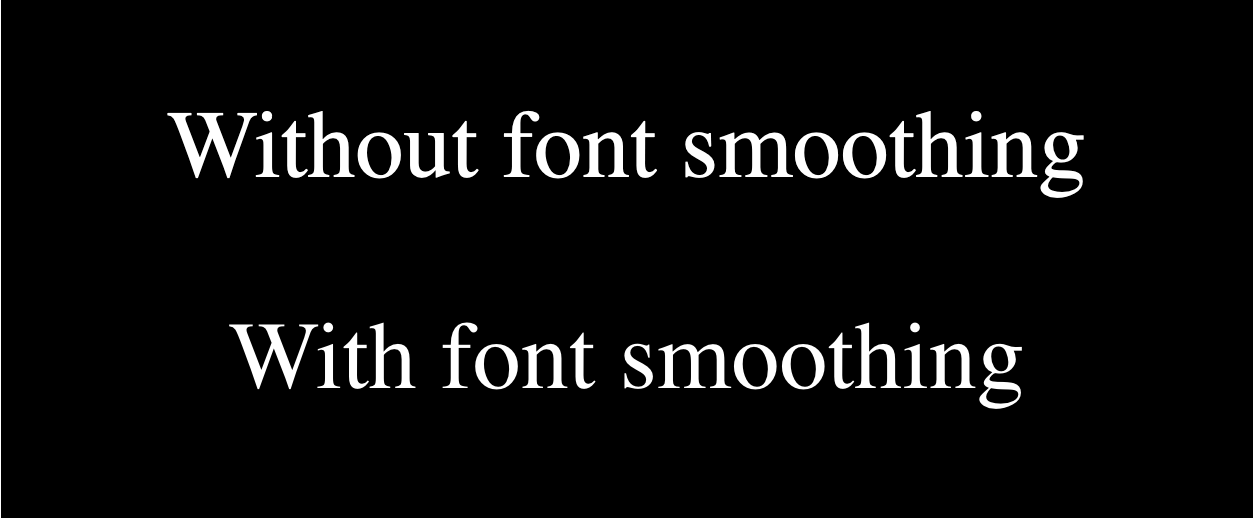
The following example shows the Safari/Chromium and Firefox equivalents that turn on font-smoothing on macOS. In both cases the smoothed font should look slightly lighter in weight.
For those of you not on a macOS system, here is a screenshot (the live version appears later on):
HTML
<p>Without font smoothing</p>

<p class="smoothed">With font smoothing</p>
CSS
html {
  background-color: black;
  color: white;
  font-size: 3rem;
}

p {
  text-align: center;
}

.smoothed {
  -webkit-font-smoothing: antialiased;
  -moz-osx-font-smoothing: grayscale;
}
Result
Specifications
Not part of any standard.
Browser compatibility
| desktop | mobile | |||||||||||
|---|---|---|---|---|---|---|---|---|---|---|---|---|
font-smooth
|
|
|
|
|
|
|
|
|
|
|
|
|
Legend
Tip: you can click/tap on a cell for more information.
- Full support
- Full support
- No support
- No support
- Non-standard. Check cross-browser support before using.
- See implementation notes.
- Uses a non-standard name
See also
- Please Stop "Fixing" Font Smoothing by Dmitry Fadeyev (2012)
- Laissez-faire font smoothing and anti-aliasing by Zach Leatherman (2017)
- Improve text rendering (A Modern CSS Reset) by Josh W. Comeau (2021)
- What's the deal with WebKit Font Smoothing? by David Bushell (2024)