linear-gradient() CSS function

Baseline Widely available *

This feature is well established and works across many devices and browser versions. It’s been available across browsers since July 2015.

* Some parts of this feature may have varying levels of support.

The linear-gradient() CSS function creates an image consisting of a progressive transition between two or more colors along a straight line. Its result is an object of the <gradient> data type, which is a special kind of <image>.

Try it

background: linear-gradient(#e66465, #9198e5);
background: linear-gradient(0.25turn, #3f87a6, #ebf8e1, #f69d3c);
background: linear-gradient(
  to left,
  #333333,
  #333333 50%,
  #eeeeee 75%,
  #333333 75%
);
background:
  linear-gradient(217deg, rgb(255 0 0 / 0.8), transparent 70.71%),
  linear-gradient(127deg, rgb(0 255 0 / 0.8), transparent 70.71%),
  linear-gradient(336deg, rgb(0 0 255 / 0.8), transparent 70.71%);
<section class="display-block" id="default-example">
  <div id="example-element"></div>
</section>
#example-element {
  min-height: 100%;
}

Syntax

css
/* A gradient with a single color of red */
linear-gradient(red)

/* A gradient tilted 45 degrees,
   starting blue and finishing red */
linear-gradient(45deg, blue, red)

/* A gradient going from the bottom right to the top left corner,
   starting blue and finishing red */
linear-gradient(to left top, blue, red)

/* Interpolation in rectangular color space */
linear-gradient(in oklab, blue, red)

/* Interpolation in polar color space */
linear-gradient(in hsl, blue, red)

/* Interpolation in polar color space
  with longer hue interpolation method */
linear-gradient(in hsl longer hue, blue, red)

/* Color stop: A gradient going from the bottom to top,
   starting blue, turning green at 40% of its length,
   and finishing red */
linear-gradient(0deg, blue, green 40%, red)

/* Color hint: A gradient going from the left to right,
   starting red, getting to the midpoint color
   10% of the way across the length of the gradient,
   taking the rest of the 90% of the length to change to blue */
linear-gradient(.25turn, red, 10%, blue)

/* Multi-position color stop: A gradient tilted 45 degrees,
   with a red bottom-left half and a blue top-right half,
   with a hard line where the gradient changes from red to blue */
linear-gradient(45deg, red 0 50%, blue 50% 100%)

Values

<side-or-corner>

The position of the gradient line's starting point. If specified, it consists of the word to and up to two keywords: one indicates the horizontal side (left or right), and the other the vertical side (top or bottom). The order of the side keywords does not matter. If unspecified, it defaults to to bottom.

The values to top, to bottom, to left, and to right are equivalent to the angles 0deg, 180deg, 270deg, and 90deg, respectively. The other values are translated into an angle.

<angle>

The gradient line's angle of direction. A value of 0deg is equivalent to to top; increasing values rotate clockwise from there.

<linear-color-stop>

A color-stop's <color> value, followed by one or two optional stop positions, (each being either a <percentage> or a <length> along the gradient's axis).

<color-hint>

An interpolation hint defining how the gradient progresses between adjacent color stops. The length defines at which point between two color stops the gradient color should reach the midpoint of the color transition. If omitted, the midpoint of the color transition is the midpoint between two color stops.

Note: Rendering of color stops in CSS gradients follows the same rules as color stops in SVG gradients.

Description

As with any gradient, a linear gradient has no intrinsic dimensions; i.e., it has no natural or preferred size, nor a preferred ratio. Its concrete size will match the size of the element it applies to.

To create a linear gradient that repeats to fill its container, use the repeating-linear-gradient() function instead.

Because <gradient>s belong to the <image> data type, they can only be used where <image>s can be used. For this reason, linear-gradient() won't work on background-color and other properties that use the <color> data type.

Composition of a linear gradient

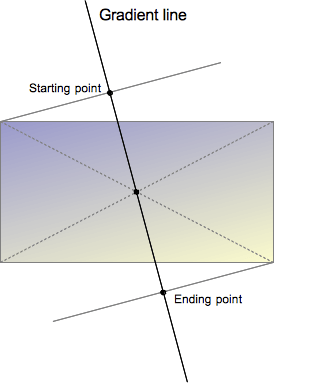
A linear gradient is defined by an axis—the gradient line—and two or more color-stop points. Each point on the axis is a distinct color; to create a smooth gradient, the linear-gradient() function draws a series of colored lines perpendicular to the gradient line, each one matching the color of the point where it intersects the gradient line.
linear-gradient.png

The gradient line is defined by the center of the box containing the gradient image and by an angle. The colors of the gradient are determined by two or more points: the starting point, the ending point, and, in between, optional color-stop points.

The starting point is the location on the gradient line where the first color begins. The ending point is the point where the last color ends. Each of these two points is defined by the intersection of the gradient line with a perpendicular line passing from the box corner which is in the same quadrant. The ending point can be understood as the symmetrical point of the starting point. These somewhat complex definitions lead to an interesting effect sometimes called magic corners: the corners nearest to the starting and ending points have the same color as their respective starting or ending points.

Customizing Gradients

By adding more color-stop points on the gradient line, you can create a highly customized transition between multiple colors. A color-stop's position can be explicitly defined by using a <length> or a <percentage>. If you don't specify the location of a color, it is placed halfway between the one that precedes it and the one that follows it. The following two gradients are equivalent.

css
linear-gradient(red, orange, yellow, green, blue);
linear-gradient(red 0%, orange 25%, yellow 50%, green 75%, blue 100%);

By default, colors transition smoothly from the color at one color-stop to the color at the subsequent color-stop, with the midpoint between the colors being the halfway point between the color transition. You can move this midpoint to any position between two color-stops by adding an unlabelled % color hint between the two colors to indicate where the middle of the color transition should be. The following example is solid red from the start to the 10% mark and solid blue from 90% to the end. Between 10% and 90% the color transitions from red to blue, however, the midpoint of the transition is at the 30% mark rather than 50% as would have happened without the 30% color hint.

css
linear-gradient(red 10%, 30%, blue 90%);

If two or more color-stops are at the same location, the transition will be a hard line between the first and last colors declared at that location.

Color-stops should be listed in ascending order. Subsequent color-stops of lower value will override the value of the previous color-stop creating a hard transition. The following changes from red to yellow at the 40% mark, and then transitions from yellow to blue over 25% of the gradient:

css
linear-gradient(red 40%, yellow 30%, blue 65%);

Multi-position color-stops are allowed. A color can be declared as two adjacent color-stops by including both positions in the CSS declaration. The following three gradients are equivalent:

css
linear-gradient(red 0%, orange 10%, orange 30%, yellow 50%, yellow 70%, green 90%, green 100%);
linear-gradient(red, orange 10% 30%, yellow 50% 70%, green 90%);
linear-gradient(red 0%, orange 10% 30%, yellow 50% 70%, green 90% 100%);

By default, if there is no color with a 0% stop, the first color declared will be at that point. Similarly, the last color will continue to the 100% mark, or be at the 100% mark if no length has been declared on that last stop.

Formal syntax

<linear-gradient()> = 
linear-gradient( [ <linear-gradient-syntax> ] )

<linear-gradient-syntax> =
[ [ <angle> | <zero> | to <side-or-corner> ] || <color-interpolation-method> ]? , <color-stop-list>

<side-or-corner> =
[ left | right ] ||
[ top | bottom ]

<color-interpolation-method> =
in [ <rectangular-color-space> | <polar-color-space> <hue-interpolation-method>? | <custom-color-space> ]

<color-stop-list> =
<linear-color-stop> , [ <linear-color-hint>? , <linear-color-stop> ]#?

<rectangular-color-space> =
srgb |
srgb-linear |
display-p3 |
display-p3-linear |
a98-rgb |
prophoto-rgb |
rec2020 |
lab |
oklab |
<xyz-space>

<polar-color-space> =
hsl |
hwb |
lch |
oklch

<hue-interpolation-method> =
[ shorter | longer | increasing | decreasing ] hue

<custom-color-space> =
<dashed-ident>

<linear-color-stop> =
<color> <color-stop-length>?

<linear-color-hint> =
<length-percentage>

<xyz-space> =
xyz |
xyz-d50 |
xyz-d65

<color-stop-length> =
<length-percentage>{1,2}

<length-percentage> =
<length> |
<percentage>

Examples

Gradient at a 45-degree angle

css
body {
  background: linear-gradient(45deg, red, blue);
}

Gradient that starts at 60% of the gradient line

css
body {
  background: linear-gradient(135deg, orange 60%, cyan);
}

Interpolation in rectangular color space

css
body {
  background: linear-gradient(90deg in oklab, blue, red);
}

Interpolating with hue

In this example for interpolation, hsl color system is being used and hue is being interpolated.

css
.shorter {
  background: linear-gradient(90deg in hsl shorter hue, red, blue);
}

.longer {
  background: linear-gradient(90deg in hsl longer hue, red, blue);
}

The box on the top uses shorter interpolation, meaning color goes straight from red to blue using the shorter arc on color wheel. The box on the bottom uses longer interpolation, meaning the color goes from red to blue using the longer arc, traversing through greens, yellows, and oranges.

Gradient with multi-position color-stops

This example uses multi-position color-stops, with adjacent colors having the same color-stop value, creating a striped effect.

css
body {
  background: linear-gradient(
    to right,
    red 20%,
    orange 20% 40%,
    yellow 40% 60%,
    green 60% 80%,
    blue 80%
  );
}

More linear-gradient examples

Please see using CSS gradients for more examples.

Specifications

Specification
CSS Images Module Level 4
# linear-gradients

Browser compatibility

desktop mobile
Chrome
Edge
Firefox
Opera
Safari
Chrome Android
Firefox for Android
Opera Android
Safari on iOS
Samsung Internet
WebView Android
WebView on iOS
linear-gradient()
Chrome – Full support
Chrome 10 (Release date: 2011-03-08)
prefix
prefix Implemented with the vendor prefix: -webkit-
Chrome – Full support
Chrome 26 (Release date: 2013-03-26)
footnote Full support
Edge – Full support
Edge 12 (Release date: 2015-07-29)
footnote Full support
Firefox – Full support
Firefox 3.6 (Release date: 2010-01-21)
prefix , footnote
prefix Implemented with the vendor prefix: -moz-
footnote Since Firefox 42, the prefixed version of gradients can be disabled by setting layout.css.prefixes.gradients to false.
footnote Considers <angle> to start to the right, instead of the top. I.e. it considered an angle of 0deg as a direction indicator pointing to the right.
Firefox – Full support
Firefox 49 (Release date: 2016-09-20)
prefix
prefix Implemented with the vendor prefix: -webkit-
Firefox – Full support
Firefox 16 (Release date: 2012-10-09)
footnote Full support
Opera – No support
Opera 11 – 12.1 (Release date: 2010-12-16)
prefix
prefix Implemented with the vendor prefix: -o-
footnote Considers <angle> to start to the right, instead of the top. I.e. it considered an angle of 0deg as a direction indicator pointing to the right.
Opera – Full support
Opera 15 (Release date: 2013-07-02)
prefix , footnote
prefix Implemented with the vendor prefix: -webkit-
footnote Considers <angle> to start to the right, instead of the top. I.e. it considered an angle of 0deg as a direction indicator pointing to the right.
Opera – Full support
Opera 12.1 (Release date: 2012-11-20)
footnote Full support
Safari – Full support
Safari 5.1 (Release date: 2011-07-20)
prefix , footnote
prefix Implemented with the vendor prefix: -webkit-
footnote Safari 4 was supporting an experimental -webkit-gradient(linear,…) function. It is more limited than the later standard version: you cannot specify both a position and an angle like in linear-gradient(). This old outdated syntax is still supported for compatibility purposes.
footnote Considers <angle> to start to the right, instead of the top. I.e. it considered an angle of 0deg as a direction indicator pointing to the right.
Safari – Full support
Safari 7 (Release date: 2013-10-22)
footnote Full support
Chrome Android – Full support
Chrome Android 18 (Release date: 2012-06-27)
prefix
prefix Implemented with the vendor prefix: -webkit-
Chrome Android – Full support
Chrome Android 26 (Release date: 2013-04-03)
footnote Full support
Firefox for Android – Full support
Firefox for Android 4 (Release date: 2011-03-29)
prefix , footnote
prefix Implemented with the vendor prefix: -moz-
footnote Since Firefox for Android 42, the prefixed version of gradients can be disabled by setting layout.css.prefixes.gradients to false.
footnote Considers <angle> to start to the right, instead of the top. I.e. it considered an angle of 0deg as a direction indicator pointing to the right.
Firefox for Android – Full support
Firefox for Android 49 (Release date: 2016-09-20)
prefix
prefix Implemented with the vendor prefix: -webkit-
Firefox for Android – Full support
Firefox for Android 16 (Release date: 2012-10-09)
footnote Full support
Opera Android – No support
Opera Android 11 – 12.1 (Release date: 2011-03-22)
prefix
prefix Implemented with the vendor prefix: -o-
footnote Considers <angle> to start to the right, instead of the top. I.e. it considered an angle of 0deg as a direction indicator pointing to the right.
Opera Android – Full support
Opera Android 14 (Release date: 2013-05-21)
prefix , footnote
prefix Implemented with the vendor prefix: -webkit-
footnote Considers <angle> to start to the right, instead of the top. I.e. it considered an angle of 0deg as a direction indicator pointing to the right.
Opera Android – Full support
Opera Android 12.1 (Release date: 2012-10-09)
footnote Full support
Safari on iOS – Full support
Safari on iOS 5 (Release date: 2011-10-12)
prefix , footnote
prefix Implemented with the vendor prefix: -webkit-
footnote Safari on iOS 3.2 was supporting an experimental -webkit-gradient(linear,…) function. It is more limited than the later standard version: you cannot specify both a position and an angle like in linear-gradient(). This old outdated syntax is still supported for compatibility purposes.
footnote Considers <angle> to start to the right, instead of the top. I.e. it considered an angle of 0deg as a direction indicator pointing to the right.
Safari on iOS – Full support
Safari on iOS 7 (Release date: 2013-09-18)
footnote Full support
Samsung Internet – Full support
Samsung Internet 1 (Release date: 2013-04-27)
prefix
prefix Implemented with the vendor prefix: -webkit-
Samsung Internet – Full support
Samsung Internet 1.5 (Release date: 2013-09-25)
footnote Full support
WebView Android – Full support
WebView Android 4.4 (Release date: 2013-12-09)
prefix
prefix Implemented with the vendor prefix: -webkit-
WebView Android – Full support
WebView Android 4.4 (Release date: 2013-12-09)
footnote Full support
WebView on iOS – Full support
WebView on iOS 5 (Release date: 2011-10-12)
prefix , footnote
prefix Implemented with the vendor prefix: -webkit-
footnote WebView on iOS 3.2 was supporting an experimental -webkit-gradient(linear,…) function. It is more limited than the later standard version: you cannot specify both a position and an angle like in linear-gradient(). This old outdated syntax is still supported for compatibility purposes.
footnote Considers <angle> to start to the right, instead of the top. I.e. it considered an angle of 0deg as a direction indicator pointing to the right.
WebView on iOS – Full support
WebView on iOS 7 (Release date: 2013-09-18)
footnote Full support
Double-position color stops
Chrome – Full support
Chrome 71 (Release date: 2018-12-04)
footnote Full support
Edge – Full support
Edge 79 (Release date: 2020-01-15)
footnote Full support
Firefox – Full support
Firefox 64 (Release date: 2018-12-11)
footnote Full support
Opera – Full support
Opera 58 (Release date: 2019-01-23)
footnote Full support
Safari – Full support
Safari 12.1 (Release date: 2019-03-25)
footnote Full support
Chrome Android – Full support
Chrome Android 71 (Release date: 2018-12-04)
footnote Full support
Firefox for Android – Full support
Firefox for Android 64 (Release date: 2018-12-11)
footnote Full support
Opera Android – Full support
Opera Android 50 (Release date: 2019-02-18)
footnote Full support
Safari on iOS – Full support
Safari on iOS 12.2 (Release date: 2019-03-25)
footnote Full support
Samsung Internet – Full support
Samsung Internet 10 (Release date: 2019-08-22)
footnote Full support
WebView Android – Full support
WebView Android 71 (Release date: 2018-12-04)
footnote Full support
WebView on iOS – Full support
WebView on iOS 12.2 (Release date: 2019-03-25)
footnote Full support
Hue interpolation method
Chrome – Full support
Chrome 111 (Release date: 2023-03-07)
footnote Full support
Edge – Full support
Edge 111 (Release date: 2023-03-13)
footnote Full support
Firefox – Full support
Firefox 127 (Release date: 2024-06-11)
footnote Full support
Opera – Full support
Opera 97 (Release date: 2023-03-22)
footnote Full support
Safari – Full support
Safari 16.2 (Release date: 2022-12-13)
footnote Full support
Chrome Android – Full support
Chrome Android 111 (Release date: 2023-03-07)
footnote Full support
Firefox for Android – Full support
Firefox for Android 127 (Release date: 2024-06-11)
footnote Full support
Opera Android – Full support
Opera Android 75 (Release date: 2023-05-17)
footnote Full support
Safari on iOS – Full support
Safari on iOS 16.2 (Release date: 2022-12-13)
footnote Full support
Samsung Internet – Full support
Samsung Internet 22 (Release date: 2023-07-14)
footnote Full support
WebView Android – Full support
WebView Android 111 (Release date: 2023-03-01)
footnote Full support
WebView on iOS – Full support
WebView on iOS 16.2 (Release date: 2022-12-13)
footnote Full support
Interpolation color space
Chrome – Full support
Chrome 111 (Release date: 2023-03-07)
footnote Full support
Edge – Full support
Edge 111 (Release date: 2023-03-13)
footnote Full support
Firefox – Full support
Firefox 127 (Release date: 2024-06-11)
footnote Full support
Opera – Full support
Opera 97 (Release date: 2023-03-22)
footnote Full support
Safari – Full support
Safari 16.2 (Release date: 2022-12-13)
footnote Full support
Chrome Android – Full support
Chrome Android 111 (Release date: 2023-03-07)
footnote Full support
Firefox for Android – Full support
Firefox for Android 127 (Release date: 2024-06-11)
footnote Full support
Opera Android – Full support
Opera Android 75 (Release date: 2023-05-17)
footnote Full support
Safari on iOS – Full support
Safari on iOS 16.2 (Release date: 2022-12-13)
footnote Full support
Samsung Internet – Full support
Samsung Internet 22 (Release date: 2023-07-14)
footnote Full support
WebView Android – Full support
WebView Android 111 (Release date: 2023-03-01)
footnote Full support
WebView on iOS – Full support
WebView on iOS 16.2 (Release date: 2022-12-13)
footnote Full support
Interpolation Hints / Gradient Midpoints
Chrome – Full support
Chrome 40 (Release date: 2015-01-21)
footnote Full support
Edge – Full support
Edge 79 (Release date: 2020-01-15)
footnote Full support
Firefox – Full support
Firefox 36 (Release date: 2015-02-24)
footnote Full support
Opera – Full support
Opera 27 (Release date: 2015-01-27)
footnote Full support
Safari – Full support
Safari 7 (Release date: 2013-10-22)
footnote Full support
Chrome Android – Full support
Chrome Android 40 (Release date: 2015-01-21)
footnote Full support
Firefox for Android – Full support
Firefox for Android 36 (Release date: 2015-02-27)
footnote Full support
Opera Android – Full support
Opera Android 27 (Release date: 2015-01-29)
footnote Full support
Safari on iOS – Full support
Safari on iOS 7 (Release date: 2013-09-18)
footnote Full support
Samsung Internet – Full support
Samsung Internet 4 (Release date: 2016-03-11)
footnote Full support
WebView Android – Full support
WebView Android 40 (Release date: 2015-01-21)
footnote Full support
WebView on iOS – Full support
WebView on iOS 7 (Release date: 2013-09-18)
footnote Full support
Gradients applied to pre-multiplied color space (prevents grays from appearing in gradients with transparency)
Chrome – Full support
Chrome 29 (Release date: 2013-08-20)
footnote Full support
Edge – Full support
Edge 79 (Release date: 2020-01-15)
footnote Full support
Firefox – Full support
Firefox 36 (Release date: 2015-02-24)
footnote Full support
Opera – Full support
Opera 16 (Release date: 2013-08-27)
footnote Full support
Safari – Full support
Safari 15 (Release date: 2021-09-20)
footnote Full support
Chrome Android – Full support
Chrome Android 29 (Release date: 2013-08-21)
footnote Full support
Firefox for Android – Full support
Firefox for Android 36 (Release date: 2015-02-27)
footnote Full support
Opera Android – Full support
Opera Android 16 (Release date: 2013-09-18)
footnote Full support
Safari on iOS – Full support
Safari on iOS 15 (Release date: 2021-09-20)
footnote Full support
Samsung Internet – Full support
Samsung Internet 2 (Release date: 2014-10-17)
footnote Full support
WebView Android – Full support
WebView Android 4.4 (Release date: 2013-12-09)
footnote Full support
WebView on iOS – Full support
WebView on iOS 15 (Release date: 2021-09-20)
footnote Full support
Single color stop and 0-1 positions
Chrome – Full support
Chrome 135 (Release date: 2025-04-01)
footnote Full support
Edge – Full support
Edge 135 (Release date: 2025-04-04)
footnote Full support
Firefox – Full support
Firefox 136 (Release date: 2025-03-04)
footnote Full support
Opera – Full support
Opera 120 (Release date: 2025-07-02)
footnote Full support
Safari – Full support
Safari 18.4 (Release date: 2025-03-31)
footnote Full support
Chrome Android – Full support
Chrome Android 135 (Release date: 2025-04-01)
footnote Full support
Firefox for Android – Full support
Firefox for Android 136 (Release date: 2025-03-04)
footnote Full support
Opera Android – Full support
Opera Android 89 (Release date: 2025-04-29)
footnote Full support
Safari on iOS – Full support
Safari on iOS 18.4 (Release date: 2025-03-31)
footnote Full support
Samsung Internet – Full support
Samsung Internet 29 (Release date: 2025-10-25)
footnote Full support
WebView Android – Full support
WebView Android 135 (Release date: 2025-04-01)
footnote Full support
WebView on iOS – Full support
WebView on iOS 18.4 (Release date: 2025-03-31)
footnote Full support
to keyword
Chrome – Full support
Chrome 26 (Release date: 2013-03-26)
footnote Full support
Edge – Full support
Edge 12 (Release date: 2015-07-29)
footnote Full support
Firefox – Full support
Firefox 10 (Release date: 2012-01-31)
footnote Full support
Opera – Full support
Opera 12.1 (Release date: 2012-11-20)
footnote Full support
Safari – Full support
Safari 7 (Release date: 2013-10-22)
footnote Full support
Chrome Android – Full support
Chrome Android 26 (Release date: 2013-04-03)
footnote Full support
Firefox for Android – Full support
Firefox for Android 10 (Release date: 2012-01-31)
footnote Full support
Opera Android – Full support
Opera Android 14 (Release date: 2013-05-21)
footnote Full support
Safari on iOS – Full support
Safari on iOS 7 (Release date: 2013-09-18)
footnote Full support
Samsung Internet – Full support
Samsung Internet 1.5 (Release date: 2013-09-25)
footnote Full support
WebView Android – Full support
WebView Android 4.4 (Release date: 2013-12-09)
footnote Full support
WebView on iOS – Full support
WebView on iOS 7 (Release date: 2013-09-18)
footnote Full support
Unitless 0 for <angle>
Chrome – Full support
Chrome 26 (Release date: 2013-03-26)
footnote Full support
Edge – Full support
Edge 12 (Release date: 2015-07-29)
footnote Full support
Firefox – Partial support
Firefox 46 – 54 (Release date: 2016-04-26)
footnote Partial support
footnote Accepted only in -webkit-linear-gradient() and -moz-linear-gradient(), not linear-gradient().
Firefox – Full support
Firefox 55 (Release date: 2017-08-08)
footnote Full support
Opera – Full support
Opera 16 (Release date: 2013-08-27)
footnote Full support
Safari – Full support
Safari 7 (Release date: 2013-10-22)
footnote Full support
Chrome Android – Full support
Chrome Android 26 (Release date: 2013-04-03)
footnote Full support
Firefox for Android – Partial support
Firefox for Android 46 – 54 (Release date: 2016-04-26)
footnote Partial support
footnote Accepted only in -webkit-linear-gradient() and -moz-linear-gradient(), not linear-gradient().
Firefox for Android – Full support
Firefox for Android 55 (Release date: 2017-08-08)
footnote Full support
Opera Android – Full support
Opera Android 14 (Release date: 2013-05-21)
footnote Full support
Safari on iOS – Full support
Safari on iOS 7 (Release date: 2013-09-18)
footnote Full support
Samsung Internet – Full support
Samsung Internet 1.5 (Release date: 2013-09-25)
footnote Full support
WebView Android – Full support
WebView Android 4.4 (Release date: 2013-12-09)
footnote Full support
WebView on iOS – Full support
WebView on iOS 7 (Release date: 2013-09-18)
footnote Full support

Legend

Tip: you can click/tap on a cell for more information.

Full support
Full support
Partial support
Partial support
Requires a vendor prefix or different name for use.
Has more compatibility info.

See also