steps() CSS function
Baseline
Widely available
This feature is well established and works across many devices and browser versions. It’s been available across browsers since July 2015.
The steps() CSS function defines a transition that divides the input time into a specified number of intervals that are equal in length. This subclass of step functions are sometimes also called staircase functions.
Syntax
/* Different intervals */
steps(2, end)
steps(4, jump-end)
steps(12, end)

/* Different jump positions */
steps(3, jump-start)
steps(3, jump-end)
steps(3, jump-none)
steps(3, jump-both)
Parameters
The function accepts the following parameters:
<integer>-
Represents the number of equidistant intervals or 'steps'. It must be a positive integer greater than
0unless the second parameter isjump-none, in which case, it must be a positive integer greater than1. <step-position>-
Specifies when the jump between values occurs. If omitted, it defaults to
end. The possible keyword values include:jump-startorstart-
Indicates that the first step happens when the animation begins.
jump-endorend-
Indicates that the last step happens when the animation ends.
jump-none-
Indicates neither early nor late jumps happen.
jump-both-
Indicates both early and late jumps happen.
Description
The steps() function divides the animation duration into equal intervals.
For example, steps(4, end) divides the animation into four equal intervals, with values changing at the end of each interval except the last change which occurs at the animation's end.
If an animation contains multiple segments, the specified number of steps applies to each segment. For example, if an animation has three segments and uses steps(2), there will be six steps in total, with two steps per segment.
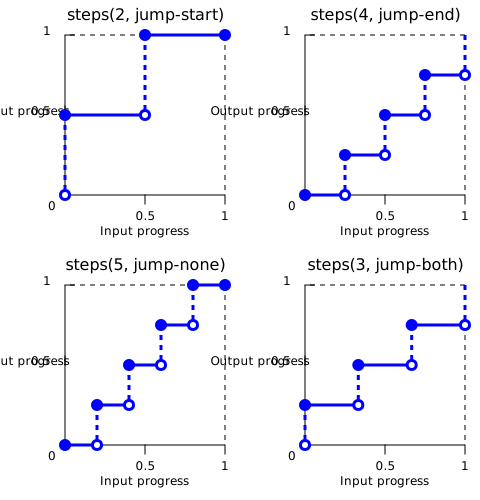
The following image shows the affect of different <step-position> values when the jumps occur:
steps(2, jump-start)  /* Or steps(2, start) */
steps(4, jump-end)    /* Or steps(4, end) */
steps(5, jump-none)
steps(3, jump-both)
Formal syntax
<steps()> =
  steps( <integer> , <step-position>? )

<integer> =
  <number-token>

<step-position> =
  jump-start  |
  jump-end    |
  jump-none   |
  jump-both   |
  start       |
  end
Examples
Using the steps() function
The following steps() functions are valid:
/* Five steps with jump at the end */
steps(5, end)

/* Two steps with jump at the start */
steps(2, start)

/* Using default second parameter */
steps(2)
The following steps() functions are invalid:
/* First parameter must be an <integer>, not a real value */
steps(2.0, jump-end)

/* Number of steps must be positive */
steps(-3, start)

/* Number of steps must be at least 1 */
steps(0, jump-none)
Specifications
| Specification |
|---|
| CSS Easing Functions Level 1 # step-easing-functions |
Browser compatibility
| desktop | mobile | |||||||||||
|---|---|---|---|---|---|---|---|---|---|---|---|---|
steps() with start, end or no direction
|
|
|
|
|
|
|
|
|
|
|
|
|
jump- keywords for steps()
|
|
|
|
|
|
|
|
|
|
|
|
|
Legend
Tip: you can click/tap on a cell for more information.
- Full support
- Full support
See also
- Other easing functions:
cubic-bezier()andlinear() - CSS easing functions module
- Step function on Wikipedia