font-style CSS at-rule descriptor
Baseline
Widely available
This feature is well established and works across many devices and browser versions. It’s been available across browsers since July 2015.
The font-style CSS descriptor allows authors to specify font styles for the fonts specified in the @font-face at-rule.
For a particular font family, authors can download various font faces that correspond to the different styles of the same font family and then use the font-style descriptor to explicitly specify the font face's style. The values for this CSS descriptor are the same as that of the corresponding font-style property.
Syntax
font-style: normal;
font-style: italic;
font-style: oblique;
font-style: oblique 30deg;
font-style: oblique 30deg 50deg;
Values
normal-
Selects the normal version of the font-family.
italic-
Specifies that font-face is an italicized version of the normal font.
oblique-
Specifies that the font-face is an artificially sloped version of the normal font.
obliquewith angle-
Selects a font classified as
oblique, and additionally specifies an angle for the slant of the text. obliquewith angle range-
Selects a font classified as
oblique, and additionally specifies a range of allowable angle for the slant of the text. Note that a range is only supported when thefont-styleisoblique; forfont-style: normaloritalic, no second value is allowed.
Formal definition
| Related at-rule | @font-face |
|---|---|
| Initial value | normal |
| Computed value | as specified |
Formal syntax
font-style =
  auto                                      |
  normal                                    |
  italic                                    |
  left                                      |
  right                                     |
  oblique [ <angle [-90deg,90deg]>{1,2} ]?
Examples
Specifying an italic font style
As an example, consider the garamond font family, in its normal form, we get the following result:
@font-face {
  font-family: "garamond";
  src: url("garamond.ttf");
}
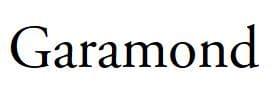
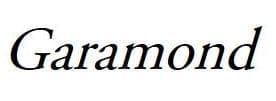
The italicized version of this text uses the same glyphs present in the unstyled version, but they are artificially sloped by a few degrees.
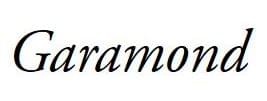
On the other hand, if a true italicized version of the font family exists, we can include it in the src descriptor and specify the font style as italic, so that it is clear that the font is italicized. True italics use different glyphs and are a bit different from their upright counterparts, having some unique features and generally have a rounded and calligraphic quality. These fonts are specially created by font designers and are not artificially sloped.
@font-face {
  font-family: "garamond";
  src: url("garamond-italic.ttf");
  font-style: italic;
}
Specifications
| Specification |
|---|
| CSS Fonts Module Level 4 # font-prop-desc |
Browser compatibility
| desktop | mobile | |||||||||||
|---|---|---|---|---|---|---|---|---|---|---|---|---|
font-style
|
|
|
|
|
|
|
|
|
|
|
|
|
Legend
Tip: you can click/tap on a cell for more information.
- Full support
- Full support